HISTORY tab to show records in ASC order of updates
A
Aishwarya WALIA
started a topic
6 months ago
Can we configure the Golden History records transition such that the HISTORY tab always shows records sorted by updated date?
Best Answer
H
Haashim Jhungeer
said
6 months ago
Hi Aishwarya,
kindly find below the steps to set a default sort in the tabs required. I've used company entity as example to explain the steps.
1. On the required Entity, go to the required business view and double click to open
2. Scroll down to Transitions and select the first line and click on add new transitions
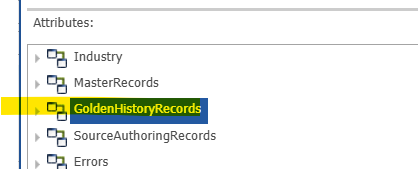
3. Select the GoldenHistoryRecords and click on next
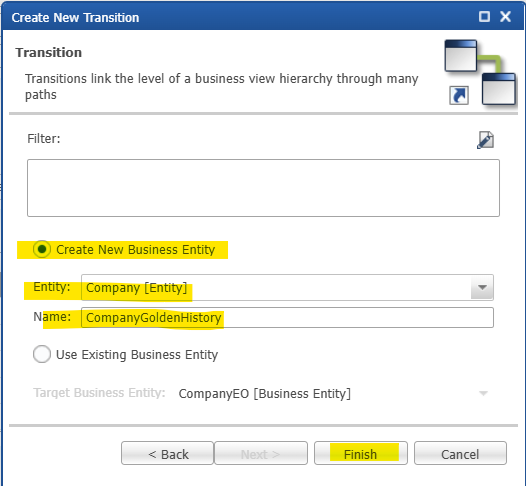
4. Select Create New Business Entity, the entity required, add a name and click on Finish
5. Select the new transitions and click on the arrow to list the dropdown and select row below the new transition (CompanyGoldenHistory in this case) .
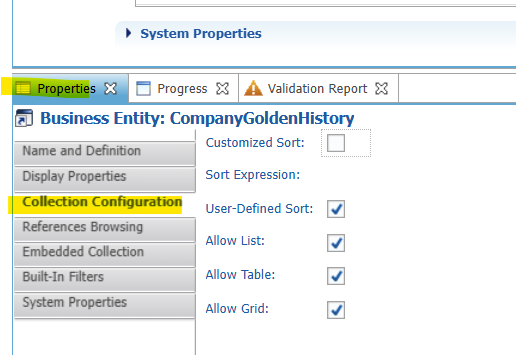
6. Scroll down to Properties tab and click on Collection Configuration
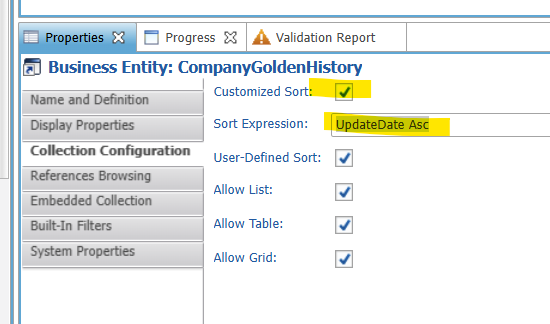
7. Tick Customized Sort and in the sort expression add UpdateDate Asc or UpdateDate Desc depending on how you want to sort the records
8. Save the model, validate and then go to your application and refresh.
Thanks, Haashim
1 Comment
H
Haashim Jhungeer
said
6 months ago
Answer
Hi Aishwarya,
kindly find below the steps to set a default sort in the tabs required. I've used company entity as example to explain the steps.
1. On the required Entity, go to the required business view and double click to open
2. Scroll down to Transitions and select the first line and click on add new transitions
3. Select the GoldenHistoryRecords and click on next
4. Select Create New Business Entity, the entity required, add a name and click on Finish
5. Select the new transitions and click on the arrow to list the dropdown and select row below the new transition (CompanyGoldenHistory in this case) .
6. Scroll down to Properties tab and click on Collection Configuration
7. Tick Customized Sort and in the sort expression add UpdateDate Asc or UpdateDate Desc depending on how you want to sort the records
8. Save the model, validate and then go to your application and refresh.

Aishwarya WALIA
Hi Aishwarya,
kindly find below the steps to set a default sort in the tabs required. I've used company entity as example to explain the steps.
1. On the required Entity, go to the required business view and double click to open

2. Scroll down to Transitions and select the first line and click on add new transitions

3. Select the GoldenHistoryRecords and click on next
4. Select Create New Business Entity, the entity required, add a name and click on Finish
5. Select the new transitions and click on the arrow to list the dropdown and select row below the new transition (CompanyGoldenHistory in this case) .

6. Scroll down to Properties tab and click on Collection Configuration
7. Tick Customized Sort and in the sort expression add UpdateDate Asc or UpdateDate Desc depending on how you want to sort the records
8. Save the model, validate and then go to your application and refresh.
Thanks,
Haashim
Haashim Jhungeer
Hi Aishwarya,
kindly find below the steps to set a default sort in the tabs required. I've used company entity as example to explain the steps.
1. On the required Entity, go to the required business view and double click to open

2. Scroll down to Transitions and select the first line and click on add new transitions

3. Select the GoldenHistoryRecords and click on next

4. Select Create New Business Entity, the entity required, add a name and click on Finish

5. Select the new transitions and click on the arrow to list the dropdown and select row below the new transition (CompanyGoldenHistory in this case) .

6. Scroll down to Properties tab and click on Collection Configuration

7. Tick Customized Sort and in the sort expression add UpdateDate Asc or UpdateDate Desc depending on how you want to sort the records

8. Save the model, validate and then go to your application and refresh.
Thanks,
Haashim
-
Extend a model with new entities or attributes
-
Data types in xDM
-
Effective date on entities
-
Search using wild cards
-
Export a model from production and import on a development environment
-
"Allow Delete" vs "Allow Removal" privileges
-
LOV label in Named Query
-
Select location on a map and save coordinates
-
Is there a way to set up a master-detail relationship on browse mode?
-
Choose Either a Stepper or A Workflow Based on The User Privileges
See all 347 topics