
Product: Semarchy Data Platform Self-Hosted
Version: 1.4.1
Author: Hélène Zosym
Need
When you deploy the SDP Helm chart, Helm creates the platform workloads and runs a sequence of setup Jobs. These Jobs configure PostgreSQL, the search engine and Keycloak, and they create the Kubernetes Secrets and ConfigMaps that the platform pods need. Several pods cannot start until a given Job has run.
This article describes that sequence for version 1.4.1: which Job runs when, what it reads and creates, which pods wait for it, and what usually goes wrong. Use it to find the step that is blocking an installation or an upgrade.
Detailed Solution
1. Deployment sequence
Helm applies the chart in three phases: pre-install hooks, the release resources, then post-install hooks. Hooks run one at a time, ordered by hook weight and then by name, and Helm waits for each Job to complete before starting the next one.
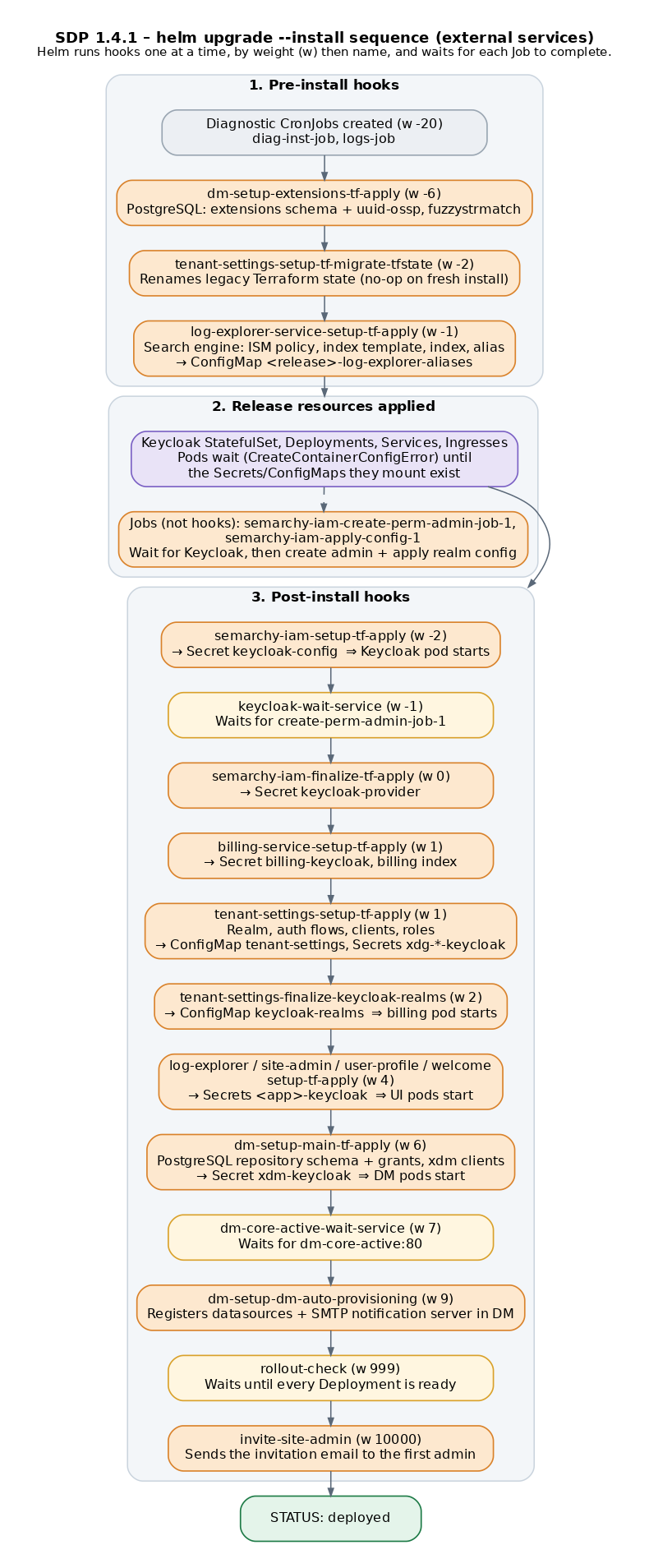
Pods waiting during installation is expected. In phase 2, Keycloak, billing, the platform applications and Data Management are created before the Secrets they mount exist. They show CreateContainerConfigError or ContainerCreating until the post-install Job that creates their Secret has run. Only investigate a pod if it is still waiting after that Job has completed.Prefixes: the tables below omit the Helm release name. With a release namedsdp, the Jobdm-setup-main-tf-applyappears assdp-dm-setup-main-tf-apply.
Secrets you create before installing (see Prepare the environment):semarchy-harbor,keycloak-postgres,dm-postgres,dm-postgres-datasource-1,dm-postgres-datasource-2,kafka-keycloak,dm-kafka,opensearch-provider,mail-secret, your TLS Secrets and, for a private CA,ca-http.
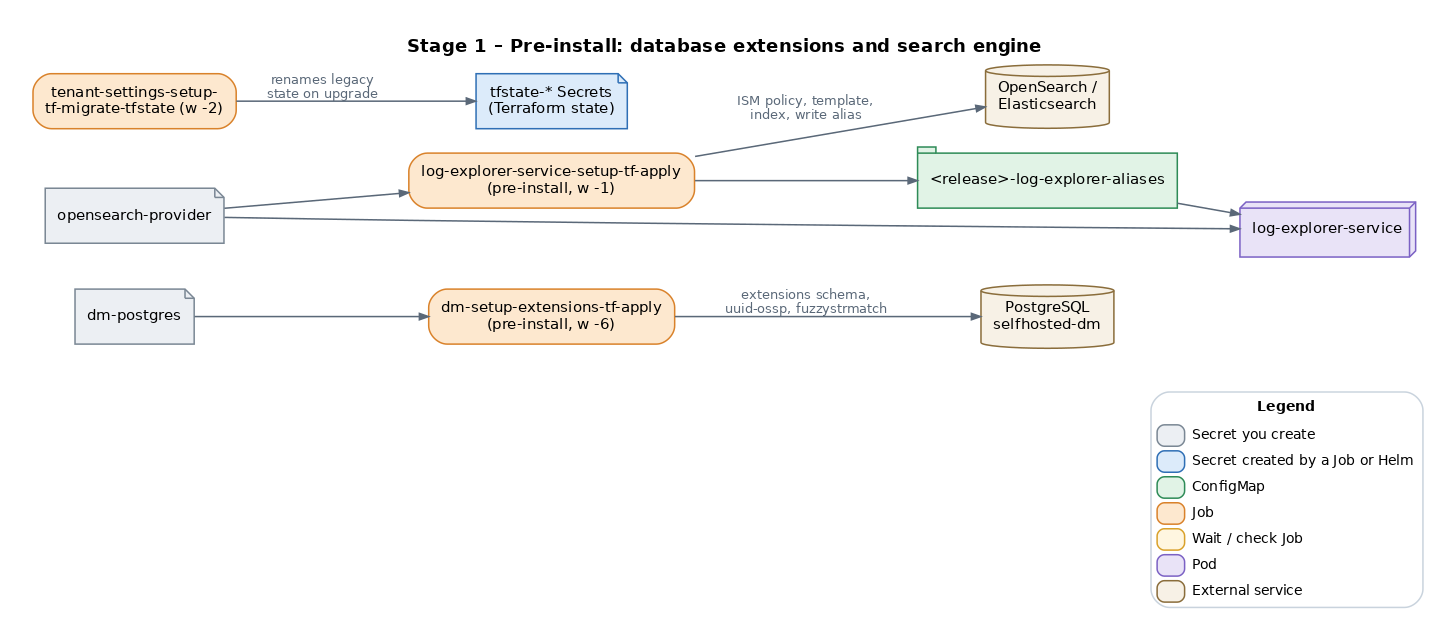
2. Stage 1: database extensions and search engine (pre-install)
| Job / pod | Hook | What it does | Needs | Frequent issues |
|---|---|---|---|---|
dm-setup-extensions-tf-apply | pre-install, pre-upgrade, w -6 | Creates the extensions schema in selfhosted-dm, owned by the repository role, and installs uuid-ossp and fuzzystrmatch in it (vector when enabled).New in 1.4: this was part of dm-setup-main-tf-apply before. | dm-postgres; network access to PostgreSQL | The extensions schema was created manually with another owner: the ownership change fails. Drop it while empty, or set its owner to the repository role.Azure: UUID-OSSP,FUZZYSTRMATCH not allow-listed in azure.extensions.TLS refused: set dm.database.repository.sslMode (default disable). |
tenant-settings-setup-tf-migrate-tfstate | pre-install, pre-upgrade, w -2 | Moves Terraform state from older Secret names to the current ones. Does nothing on a fresh installation. | None | Rare. Check the Job logs on upgrades from older versions. |
log-explorer-service-setup-tf-apply | pre-install, pre-upgrade, w -1 | Waits for the search engine, then creates the ISM policy, index template, first index and write alias for logs. Creates ConfigMap <release>-log-explorer-aliases. | opensearch-provider; network access to the search engine | Loops if the search engine is unreachable (UnknownHost, connection refused). Certificate errors with a private CA: configure global.caCert.HTTP 403: missing role permissions or wrong credentials. Upgrade from 1.1.0: "Unable to create index", see the dedicated article. |
log-explorer-service pod | Deployment | Serves log queries (/logs). | opensearch-provider, ConfigMap <release>-log-explorer-aliases | Wrong search engine URL or credentials. |
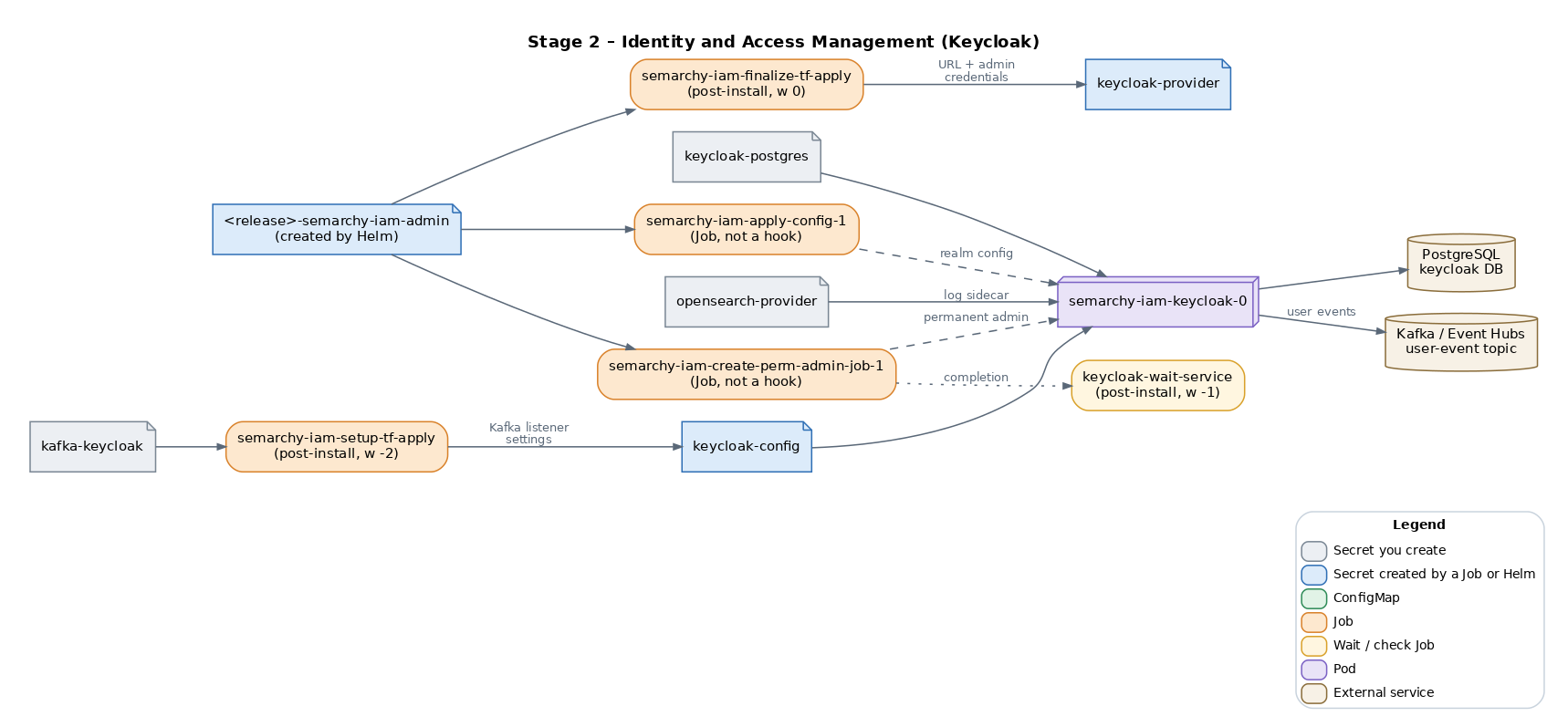
3. Stage 2: Identity and Access Management
| Job / pod | Hook | What it does | Needs | Frequent issues |
|---|---|---|---|---|
semarchy-iam-setup-tf-apply | post-install, post-upgrade, w -2 | Creates Secret keycloak-config with the Kafka event-listener settings. Keycloak cannot start before this Job.Changed: in 1.1.0 it also created keycloak-kafka. | kafka-keycloak | Missing Secret or key names that do not match values.yaml. |
semarchy-iam-keycloak-0 pod | StatefulSet | Runs Keycloak. | keycloak-postgres, keycloak-config, opensearch-provider (log sidecar); PostgreSQL and Kafka reachable | PostgreSQL or Kafka unreachable. SASL mismatch, for example Unexpected handshake request with client mechanism SCRAM-SHA-512: check the mechanism (PLAIN for Event Hubs), security protocol and listener. PostgreSQL TLS refused: add ?sslmode=require to semarchy-iam.keycloak.config.database.dbUrlProperties. |
semarchy-iam-create-perm-admin-job-1 | Job, not a hook | Waits for Keycloak, then creates the permanent admin account. | <release>-semarchy-iam-admin (created by Helm) | Loops until Keycloak is reachable. |
semarchy-iam-apply-config-1 | Job, not a hook | Waits for Keycloak and the admin Job, then applies the realm configuration (keycloak-config-cli). | <release>-semarchy-iam-admin | Loops until Keycloak is reachable. |
keycloak-wait-service | post-install, post-upgrade, w -1 | Waits for semarchy-iam-create-perm-admin-job-1 to complete. | Keycloak running | Hangs if Keycloak never becomes ready: look at the Keycloak pod first. |
semarchy-iam-finalize-tf-apply | post-install, post-upgrade, w 0 | Creates Secret keycloak-provider (Keycloak URL and admin credentials), used by every following Job. | Keycloak ready, admin Secret | Missing Secret or invalid values.yaml. |
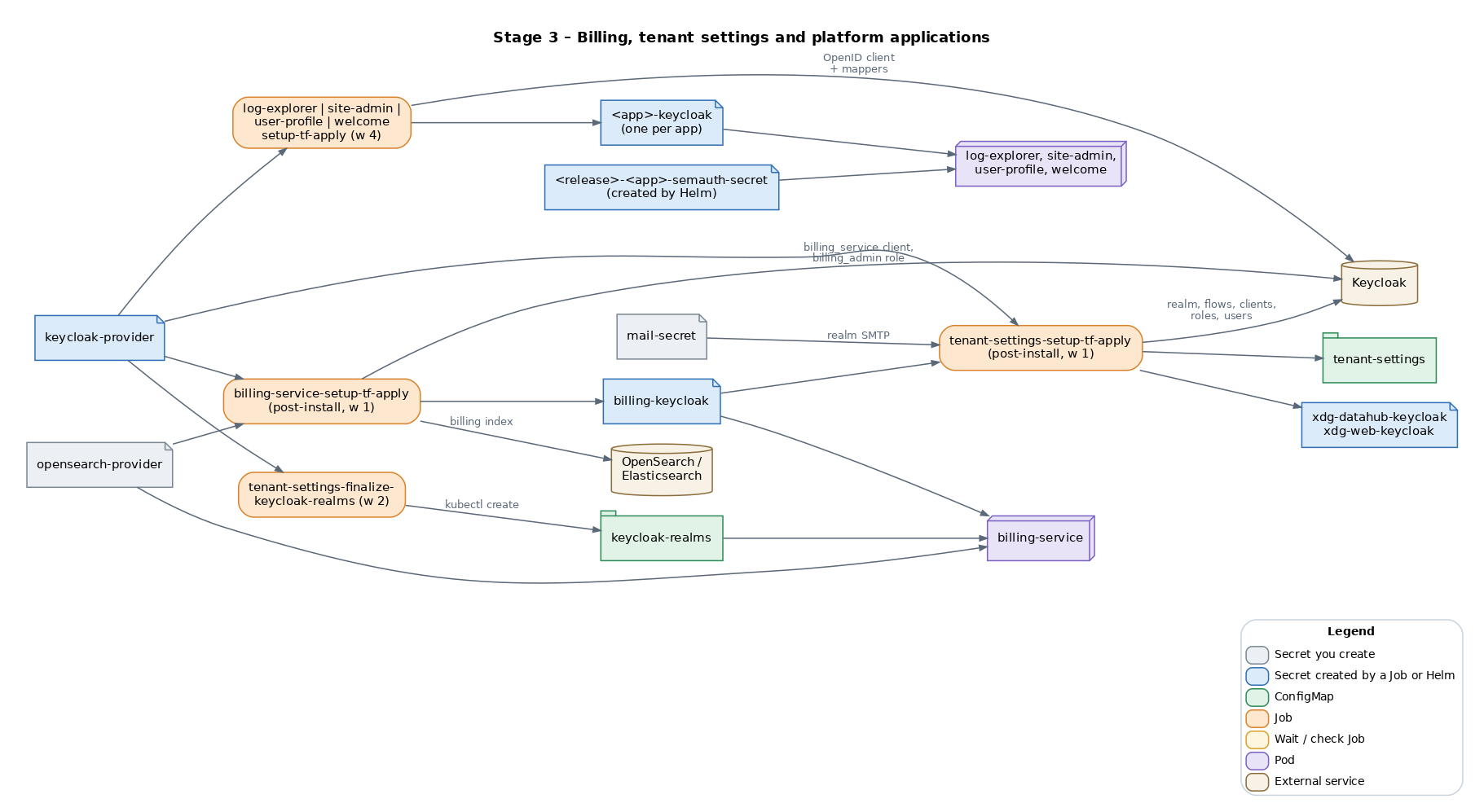
4. Stage 3: billing, tenant settings and platform applications
| Job / pod | Hook | What it does | Needs | Frequent issues |
|---|---|---|---|---|
billing-service-setup-tf-apply | post-install, post-upgrade, w 1 | Creates the Keycloak client billing_service, the billing_admin role and its mapping, and the billing index. Creates Secret billing-keycloak. | keycloak-provider, opensearch-provider | Keycloak not ready; search engine permissions (index patterns *billing*). |
tenant-settings-setup-tf-apply | post-install, post-upgrade, w 1 | Configures the platform realm: SMTP, authentication flows and required actions (MFA), user profile, roles, clients and service accounts. Creates ConfigMap tenant-settings and Secrets xdg-datahub-keycloak and xdg-web-keycloak. | keycloak-provider, mail-secret, billing-keycloak | Missing mail-secret or one of its keys. mail-secret is always required: tenant-settings.user_creation.sendEmail only controls the first admin invitation. |
tenant-settings-finalize-keycloak-realms | post-install, post-upgrade, w 2 | Builds the realm list and creates ConfigMap keycloak-realms with kubectl. | keycloak-provider | Keycloak unreachable or wrong credentials. |
billing-service pod | Deployment | Collects license usage metrics. | billing-keycloak, opensearch-provider, ConfigMap keycloak-realms | Waits in ContainerCreating until keycloak-realms exists (w 2). Not a failure while the installation is in progress. |
log-explorer-setup-tf-apply, site-admin-setup-tf-apply, user-profile-setup-tf-apply, welcome-setup-tf-apply | post-install, post-upgrade, w 4 | Create one Keycloak OpenID client and its mappers per application, and Secrets log-explorer-keycloak, site-admin-keycloak, user-profile-keycloak, welcome-keycloak. | keycloak-provider | Keycloak not ready. |
log-explorer, site-admin, user-profile, welcome pods | Deployments | Platform web applications. | <app>-keycloak, <release>-<app>-semauth-secret (created by Helm), ingress | Ingress class or TLS Secret name wrong in values.yaml. |
5. Stage 4: Data Management and first administrator
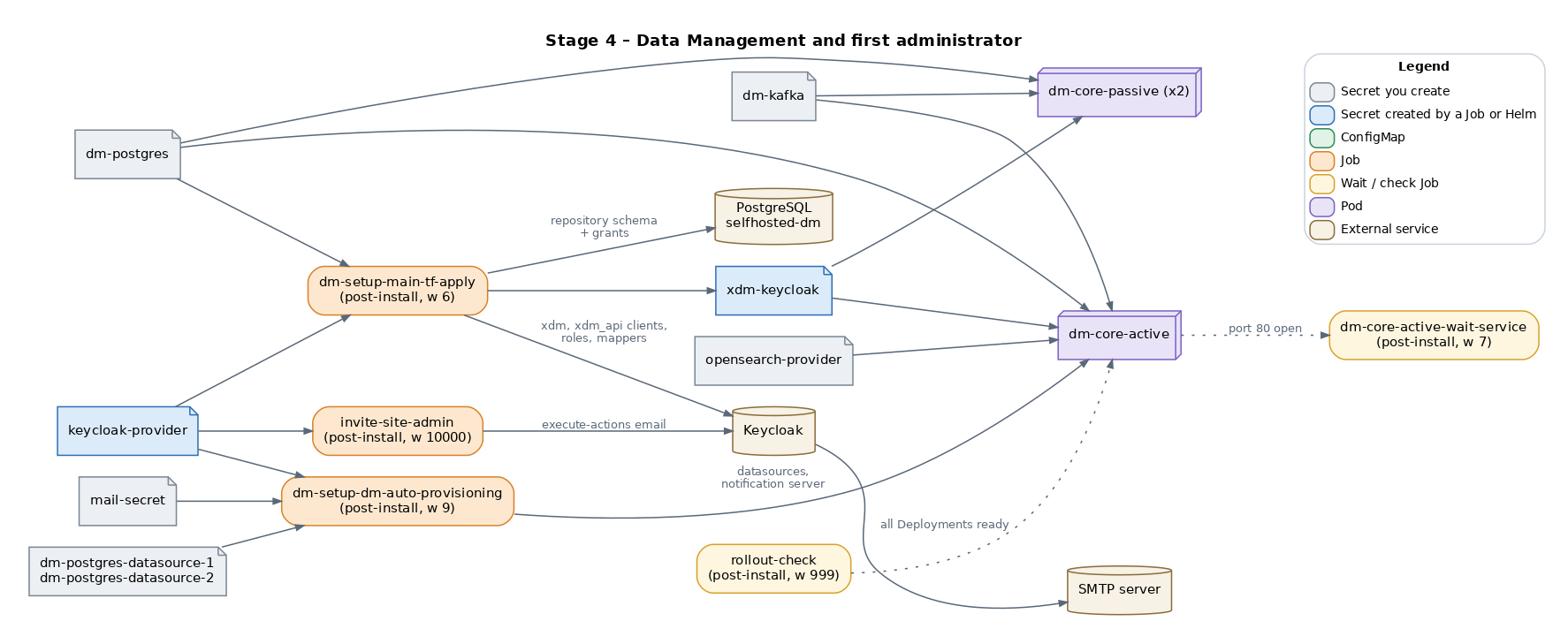
| Job / pod | Hook | What it does | Needs | Frequent issues |
|---|---|---|---|---|
dm-setup-main-tf-apply | post-install, post-upgrade, w 6 | PostgreSQL: creates the repository schema and grants. Keycloak: creates the xdm and xdm_api clients, roles and protocol mappers. Creates Secret xdm-keycloak.Changed: the extensions schema and extensions moved to dm-setup-extensions-tf-apply. | dm-postgres, keycloak-provider | PostgreSQL unreachable, TLS refused or wrong credentials. |
dm-core-active, dm-core-passive pods | Deployments | Data Management. The passive replicas serve users; the active instance runs jobs. They share a Hazelcast cluster. | dm-postgres, dm-kafka, opensearch-provider, xdm-keycloak | Wait until xdm-keycloak exists (w 6).Access denied or PostgreSQL unreachable. Topic authorization failed for topics [topic-user]: Kafka ACLs, or the topic name differs from dm.kafka.userEventTopic.Keycloak not reachable from the pod through the external URL: DNS or certificate. |
dm-core-active-wait-service | post-install, post-upgrade, w 7 | Waits until dm-core-active answers on port 80. | DM active pod ready | Hangs while the DM active pod restarts: check its logs. |
dm-setup-dm-auto-provisioning | post-install, post-upgrade, w 9 | Creates a Keycloak service client, then registers the datasources and the SMTP notification server in Data Management through its API. | keycloak-provider, dm-postgres-datasource-1, dm-postgres-datasource-2, mail-secret | Wrong datasource credentials or schema; PostgreSQL unreachable. |
rollout-check | post-install, post-upgrade, w 999 | Waits until every Deployment in the namespace is ready, then lets Helm finish. | None | Times out if a Deployment never becomes ready: the Job log names it. |
semarchy-data-platform-invite-site-admin | post-install, post-upgrade, w 10000 | Asks Keycloak to send the invitation email to the first administrator. | keycloak-provider, SMTP through Keycloak | Failed to send execute actions email: SMTP host, port, TLS or credentials in mail-secret. |
6. Jobs that run only during an upgrade
| Job | Hook | What it does |
|---|---|---|
billing-index-migration | pre-upgrade, w -5 | Fixes the mapping of the sdp-billing-metrics index if it exists. |
<app>-setup-tf-state-migration (log-explorer, site-admin, user-profile, welcome) | post-upgrade, w 3 | Moves each application's Terraform state from the old selfhosted workspace to the current one, before the setup Job at w 4. |
<app>-setup-tf-state-migration-cleanup | post-upgrade, w 5 | Removes the old state once the setup Job has succeeded. |
All other setup Jobs run again on every upgrade. They are Terraform applies against the state stored in tfstate-* Secrets in the namespace, so they only change what differs. Do not delete these Secrets outside an uninstall.
7. Jobs that run on uninstall
helm uninstall runs pre-delete Jobs that remove what the setup Jobs created: <app>-clean, semarchy-iam-clean, billing-service-clean, tenant-settings-clean, semarchy-iam-finalize-tf-destroy, and the post-delete log-explorer-service-clean. They do not drop your databases, Kafka objects or search engine users; follow Uninstall the platform for those.
8. Internal and user communications after setup
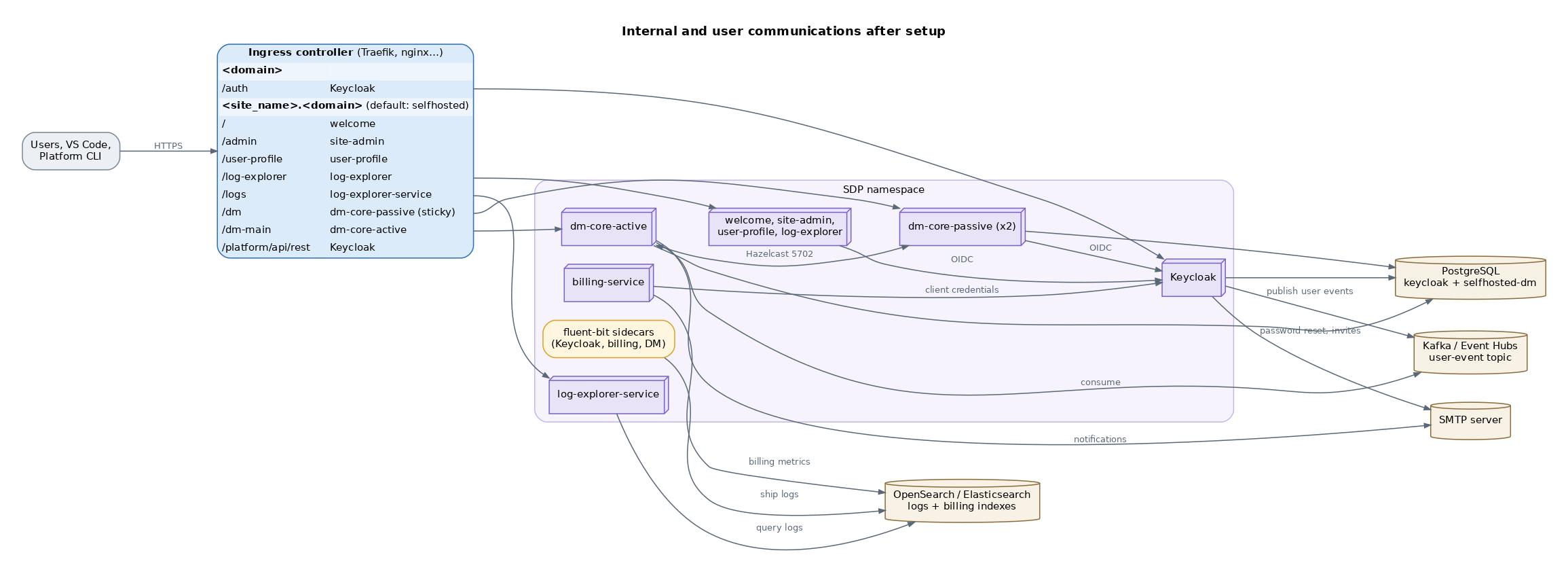
- Users and tools reach the platform through the ingress controller on two hostnames:
<domain>for Keycloak and<site_name>.<domain>for the applications. Both need DNS records pointing to the ingress controller; a wildcard record*.<domain>covers the second one. selfhostedis the default site name. To use another subdomain, setglobal.site_idandglobal.site_nameinvalues.yaml, and use the same name in every ingress host and TLS host that the starter values file sets toselfhosted.<YOUR_GLOBAL_DOMAIN>.global.site_nameis also the name of the platform realm in Keycloak, andglobal.site_idis part of the Terraform state names, so choose them before the first installation and do not change them afterwards.- The applications authenticate users with Keycloak (OIDC). Billing and Data Management also call Keycloak with service accounts.
- Keycloak publishes user events to the Kafka topic; Data Management consumes them.
- Fluent-bit sidecars ship logs to the search engine; log-explorer-service reads them back. Billing writes usage metrics to its own index.
- Keycloak and Data Management send email through the SMTP server.
- The optional
well-known-service(/.well-known/sem-api) is disabled by default (well-known-service.enabled: false) and is not shown.
9. Best practices for installation
- Run
helm upgrade --installwithout--waitor--atomic. Keycloak, billing and Data Management pods mount Secrets and ConfigMaps created by post-install hooks, so--waitcannot succeed and--atomicrolls back an installation that was progressing normally. The chart checks readiness itself with therollout-checkJob. - Use
--timeout 20m, or more on slow networks. - Run the prechecks before installing. They validate the Secrets you create and their keys.
- If the installation stops, find the first Job or pod that is not complete and use the stage tables below to see what it needs.
- Run the built-in diagnostic tool and send the bundle to Support if you cannot find the cause.
10. Changes since the 1.1.0 version of this article
- New pre-install Job
dm-setup-extensions-tf-apply: theextensionsschema and extensions are no longer created bydm-setup-main-tf-apply. log-explorer-service-setup-tf-applyis now a pre-install hook and creates ConfigMap<release>-log-explorer-aliases.- New Jobs:
tenant-settings-setup-tf-migrate-tfstate,rollout-check,billing-index-migration, and the upgrade-only state migration Jobs. semarchy-iam-setup-tf-applycreates onlykeycloak-config.tenant-settings-finalize-keycloak-realmsnow creates ConfigMapkeycloak-realms, which the billing pod needs to start.- Diagnostic CronJobs are installed with the chart; see Troubleshoot a deployment
Demo and test installations only. Withglobal.provisioning.enabled: true, as used by the prerequisites chart, four more Jobs create the databases, users and search engine roles for you:semarchy-iam-provisioning-tf-apply,dm-prov-repo-tf-apply,billing-service-provisioning-tf-applyandlog-explorer-service-provisioning-tf-apply. They do not run in a standard installation with external services