
Product: SDP Self-Hosted
Version: 1.3.0
Author: Hélène Zosym
Issue
In some cases upgrade from SDP 1.1.0 to SDP 1.2.0/1.3.0 fails on the log-explorer-service-setup-tf-apply job with the following exception
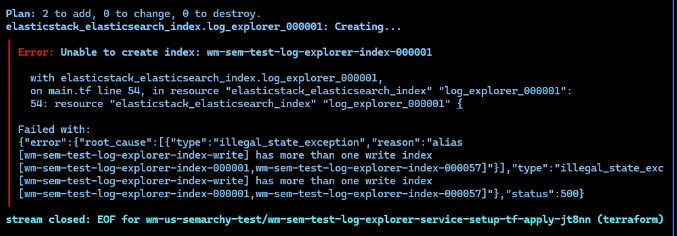
Cause
If the upgrade to 1.3.0 happens more than 30 days after the environment was installed on 1.1.0, the original index _000001 is already deleted as part of the normal rotation. Terraform job in SDP SH 1.3.0 doesn't account for this case and will try creating the index from scratch as a main write index. However, on your system the write index already exists with a different number. So the job fails as the Search Engine API blocks this attempt to create a second write index on the same alias.
Solution
Prior launching the upgrade, move the cursor out of the current index so that Terraform job could recreate the 000001.
0. Prepare environment variables
export SEARCH_ENGINE_URL="<OPEN SEARCH OR ELASTIC SEARCH URL>"
export SEARCH_ADMIN_USER="<SEARCH ENGINE ADMIN>"
export SEARCH_ADMIN_PASSWORD="<SEARCH ENGINE PASSWORD>"
export RELEASE_NAME="<YOUR RELEASE NAME>"
1. Start a temporary pod in your SDP namespace
kubectl run curl-client --rm -it --image=curlimages/curl -n default \
  --env="SEARCH_ENGINE_URL=${SEARCH_ENGINE_URL}" \
  --env="SEARCH_ADMIN_USER=${SEARCH_ADMIN_USER}" \
  --env="SEARCH_ADMIN_PASSWORD=${SEARCH_ADMIN_PASSWORD}" \
  --env="INDEX_PREFIX=${RELEASE_NAME}-log-explorer-index" \
  -- sh
2. Identify the current write cursor
curl -k -u "${SEARCH_ADMIN_USER}:${SEARCH_ADMIN_PASSWORD}" "${SEARCH_ENGINE_URL}/_cat/aliases/${INDEX_PREFIX}-*?v"In the results, note the number of the index that has is_write_true.
3. Move the cursor out of the current index
Replace the placeholder "YOUR CURRENT INDEX NUMBER FROM ERROR" with the number of the current index you see in the error message.
 curl -k -u "${SEARCH_ADMIN_USER}:${SEARCH_ADMIN_PASSWORD}" \
  -X POST "${SEARCH_ENGINE_URL}/_aliases" \
  -H 'Content-Type: application/json' \
  -d '{
    "actions": [
      {
        "add": {
          "index": "'"${INDEX_PREFIX}"'-<YOUR CURRENT INDEX NUMBER FROM ERROR>",
          "alias": "'"${INDEX_PREFIX}"'-write",
          "is_write_index": false
        }
      }
    ]
  }'
4. Delete the previously failed job
kubectl delete job sdp-semarchy-log-explorer-service-setup-tf-apply -n <YOUR NAMESPACE>
5. Execute the helm upgrade command for SDP
helm upgrade <YOUR RELEASE NAME> -n <YOUR NAMESPACE> oci://registry.na.semarchy.net/semarchy-release/semarchy-data-platform --version 1.3.0 -f values.yaml
6. Once the upgrade is completed, move the cursor back to your active index
Replace the placeholder "YOUR CURRENT INDEX NUMBER FROM ERROR" with the number of the current index you see in the error message.
   curl -k -u "${SEARCH_ADMIN_USER}:${SEARCH_ADMIN_PASSWORD}" \
  -X POST "${SEARCH_ENGINE_URL}/_aliases" \
  -H 'Content-Type: application/json' \
  -d '{
    "actions": [
      {
        "add": {
          "index": "'"${INDEX_PREFIX}"'-000001",
          "alias": "'"${INDEX_PREFIX}"'-write",
          "is_write_index": false
        }
      }
    ]
  }'

  curl -k -u "${SEARCH_ADMIN_USER}:${SEARCH_ADMIN_PASSWORD}" \
  -X POST "${SEARCH_ENGINE_URL}/_aliases" \
  -H 'Content-Type: application/json' \
  -d '{
    "actions": [
      {
    "add": {
          "index": "'"${INDEX_PREFIX}"'-<YOUR CURRENT INDEX NUMBER FROM ERROR>",
          "alias": "'"${INDEX_PREFIX}"'-write",
          "is_write_index": true
        }
      }
    ]
  }'