
Author: Michael Turchi
Product: SDP SaaS
-----------------------------------------------------------------------------
Need
Semarchy Data Platform (SaaS version) can be connected to source and target applications in several standard ways. Because the right pattern depends on data volume, latency requirements, and what the source/target application can technically expose, teams need a single reference that lists every supported integration flow, when to use it, and what it requires.
This article describes the five standard integration use cases for SDP SaaS and provides the information needed to pick the right one for a given project.
This article applies to the SDP SaaS versions prior SDP DI implementation.
Summarized Solution
This article describes two ingestion use cases (data going into SDP) and two synchronization use cases (data going out of SDP), plus one variant, each suited to a different volume/latency profile. A middleware (e.g. Semarchy xDI) is never mandatory but is generally advised, since it adds transformation, scheduling, and connector flexibility.
| # | Use case | Direction | Best for | Format |
|---|---|---|---|---|
| 1 | Ingest Data with Standard REST API | Source → SDP | Low volumes, continuous ingestion | JSON |
| 2 | Ingest Data with Bulk REST API | Source → SDP | Medium/large volumes, batch ingestion | CSV |
| 3 | Real-Time Synchronization with Data Notification | SDP → Target | Low volumes, near real-time push | REST notification |
| 4 | Pull JSON Data with Standard API | SDP → Target | Low volumes, batch/micro-batch pull | JSON |
| 5 | Pull CSV Data with Standard API | SDP → Target | Medium/large volumes, batch pull | CSV |
Detailed Solution
Prerequisites
Across all five use cases, the source, target, or middleware system generally needs:
- An HTTP REST connector supporting API-Key or Basic Auth authentication
- Outbound access to the internet
- The ability to deploy connector/middleware on-premise, on a private/public cloud, or as another SaaS
Use Case 1: Ingest Data with Standard REST API
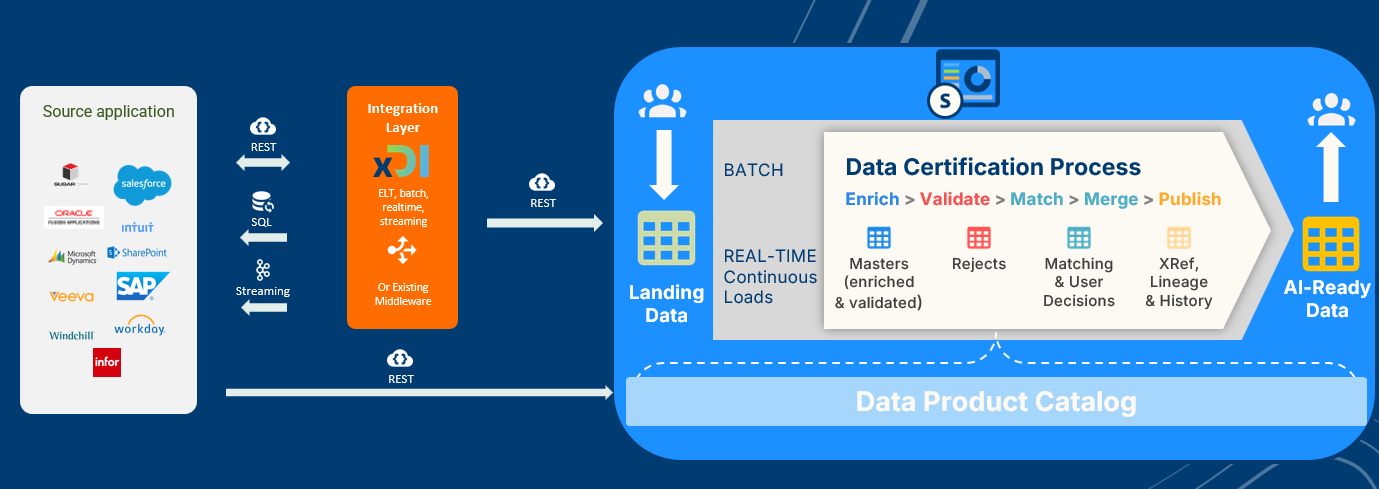
Data flows from the source application directly into SDP over REST with a JSON body, or through a middleware (e.g. Semarchy xDI) that can push data in real time or pull it via SQL, REST, streaming, or other connectors before transforming and forwarding it to SDP.
Recommended for
- Low volumes and continuous ingestion
- Middleware not mandatory, but strongly advised for:
- Cases where building the input JSON payload is difficult without a transformation layer
- Both batch and real-time ingestion
- Pulling data from the middleware through other connectors (SQL, streaming, REST, etc.)
Requirements
- Internet access
- HTTP REST connector supporting API-Key or Basic Auth authentication and JSON body
- Middleware/connector deployed on-premise, on private/public cloud, or another SaaS
Use Case 2: Ingest Data with Bulk REST API
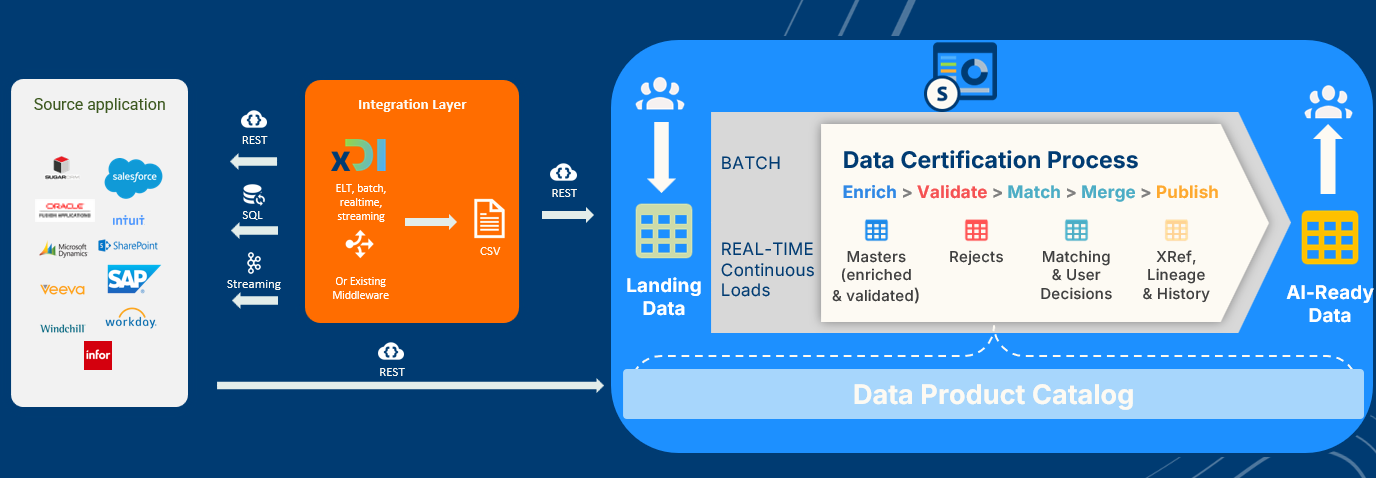
Same principle as Use Case 1, but the source application (or middleware) pushes a prepared CSV body over REST instead of JSON, making it suited to larger data volumes processed in batch.
Recommended for
- Medium/large volumes and batch ingestion
- Middleware not mandatory, but strongly advised:
- Cases where building the input CSV payload is difficult without a transformation layer
- Pulling data from the middleware through other connectors (SQL, streaming, REST, etc.)
Requirements
- Internet access
- HTTP REST connector supporting API-Key or Basic Auth authentication and CSV body
- Middleware/connector deployed on-premise, on private/public cloud, or another SaaS
Use Case 3: Real-Time Synchronization with Data Notification
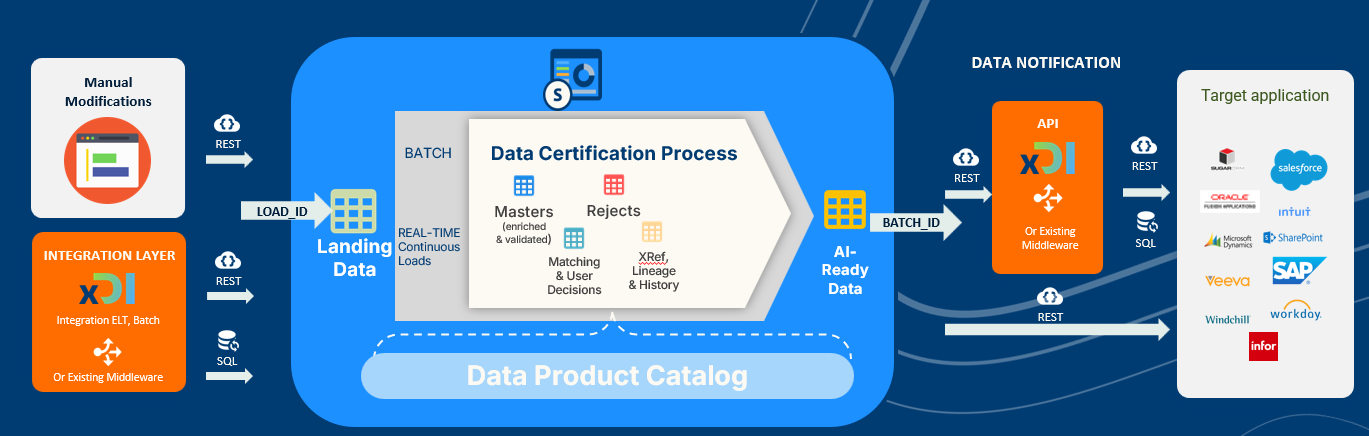
After certification, SDP pushes output data to the target application through a REST data notification. Input to SDP can come from manual modifications, a middleware, batch, real-time, or continuous ingestion. Output content can be customized using named queries.
Recommended for
- Low volumes and near real-time data spreading
- Middleware not mandatory, but useful in some cases:
- Target applications that cannot expose REST endpoints meeting the data notification requirements below
- Transformations not covered by named queries
Data notification limitations
- Only REST notifications are supported — Kafka and JMS are not supported
- Authentication is limited to Basic Auth
- TLS certificates must be public and issued by a certificate authority (no self-signed or private certificates)
Requirements
- Target application must expose an HTTP REST API publicly on the internet
- Protected with a public CA-issued certificate
- IP-range restriction is possible (SDP can provide its outbound IPs)
Warning: Check security requirements with the customer's IT team before choosing this use case. For on-premise or private-cloud target applications, confirm that security and network policies allow publishing a public REST API with a public certificate.
Use Case 4: Pull JSON Data with Standard API
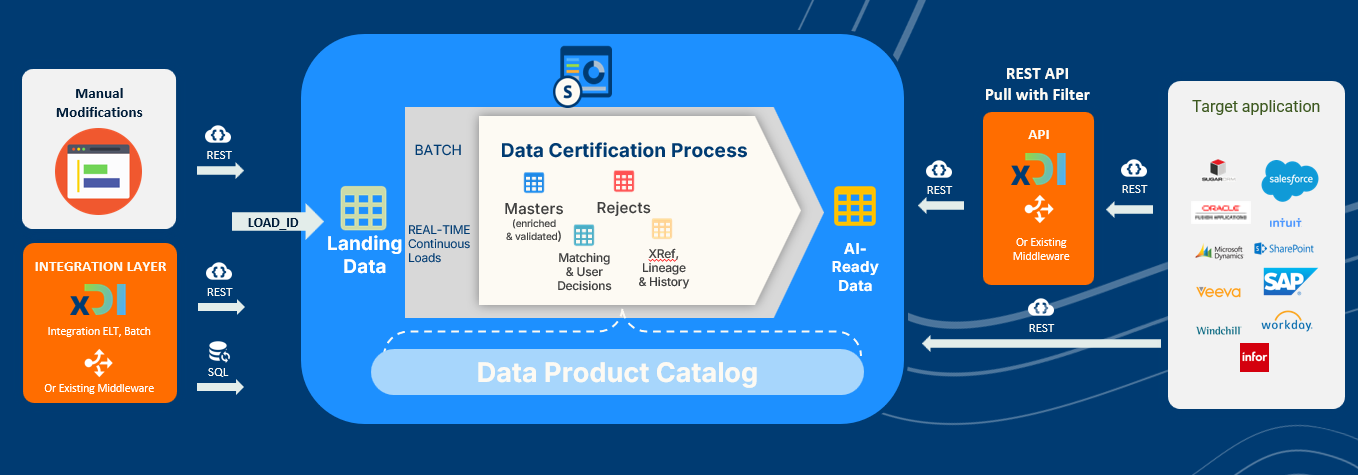
The target application (or a middleware) pulls certified data from SDP through the SDP Standard REST API, with optional filtering. Output can be customized with named queries or reshaped through a middleware.
Recommended for
- Low volumes and batch/micro-batch synchronization
- Middleware not mandatory, but strongly advised in some cases:
- Target applications that cannot pull data directly over REST
- Transformations not covered by named queries
- Target applications that don't otherwise meet the requirements below
Requirements
- Internet access
- HTTP REST connector supporting API-Key or Basic Auth authentication
- Capacity to schedule pulling requests
- Middleware/connectore deployed on-premise, on private/public cloud, or another SaaS
Use Case 5: Pull CSV Data with Standard API
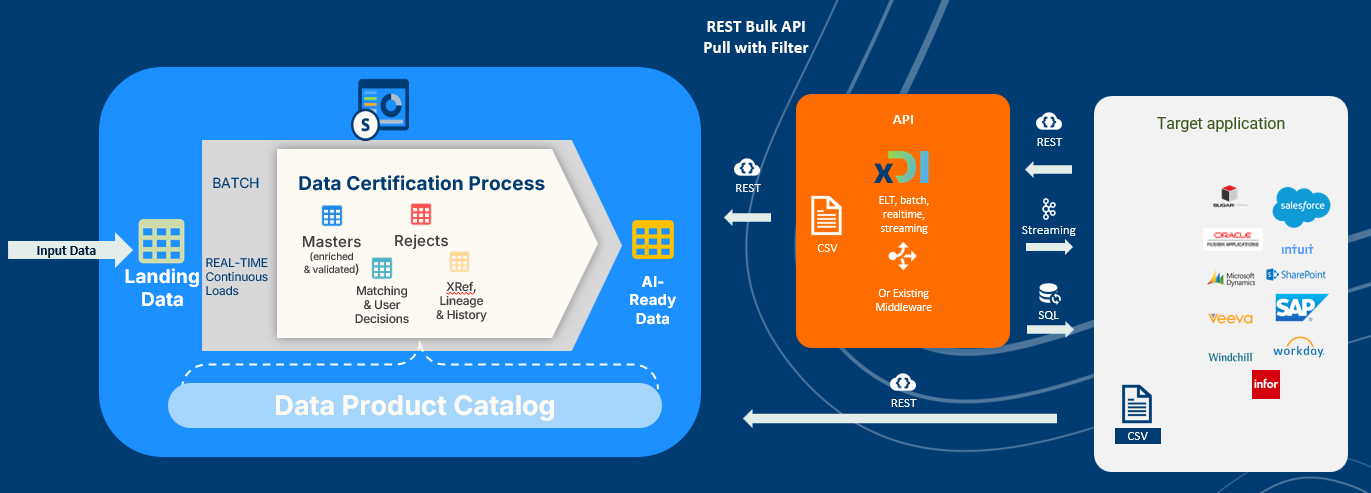
Same principle as Use Case 4, but the target application (or middleware) pulls certified data through the SDP Bulk REST API, returned as CSV — suited to larger data volumes.
Recommended for
- Medium/large volumes and batch synchronization
- Middleware not mandatory, but strongly advised in some cases:
- Target applications that cannot pull data directly over REST, or cannot ingest a CSV response from REST
- Transformations not covered by named queries
- Target applications that don't otherwise meet the requirements below
Requirements
- Internet access
- HTTP REST connector supporting API-Key or Basic Auth authentication
- CSV connector for data ingestion
- Capacity to schedule pulling requests
- Middleware/connector deployed on-premise, on private/public cloud, or another SaaS