
Product: Semarchy NativeApp (xDM)
Version: 2025.1
Author: Ambuj Srivastava
Need
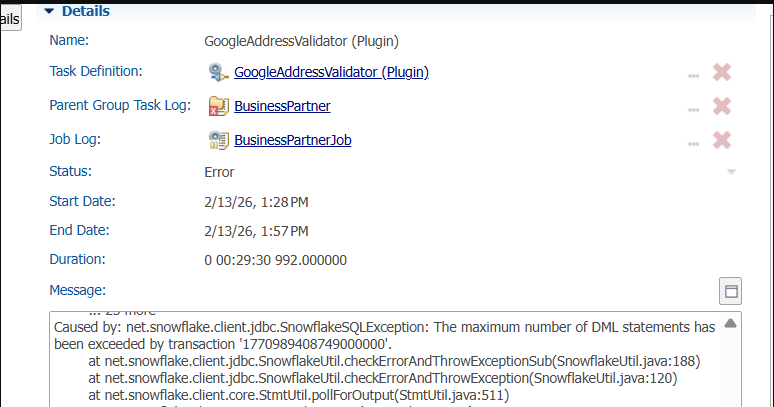
There is a limitation with Snowflake Native Apps to execute the plug-ins/Rest API enrichers due to Snowflake hybrid tables. This limitation cause integration jobs to fail with errors:
- Snowflake Secrets
- Network Rules
- External Access Integration (EAI)
- A Python UDF
- Role-based access control (RBAC)
- Calls Google Address Validation API
- Normalizes and validates address input
- Returns structured output as VARIANT (JSON)
- Create Secrets
- Create Network Rules
- Create External Access Integrations
- A valid Google Address Validation API Key
CREATE OR REPLACE SECRET GMAPS_ADDRESSVALIDATION_KEY
TYPE = GENERIC_STRING
SECRET_STRING = 'YOUR_GOOGLE_API_KEY';
Step 2: Grant Role Access to Database
GRANT USAGE ON DATABASE CUSTOMERB2C TO ROLE semarchy_customer_b2c_mdm;
Step 3: Grant Role Access to Secret
GRANT READ ON SECRET
CUSTOMERB2C.CUSTOMERB2C.GMAPS_ADDRESSVALIDATION_KEY
TO ROLE semarchy_customer_b2c_mdm;
This allows the role to retrieve the secret during UDF execution.
Step 4: Create Network Rule (Egress Configuration)
This defines allowed outbound traffic.
CREATE OR REPLACE NETWORK RULE GOOGLE_ADDRESSVALIDATION_EGRESS
MODE = EGRESS
TYPE = HOST_PORT
VALUE_LIST = ('addressvalidation.googleapis.com:443');
This allows secure HTTPS calls to Google API.
Step 5: Create External Access Integration
This links:
- Network rule
- Secret
- Enables outbound API calls
CREATE OR REPLACE EXTERNAL ACCESS INTEGRATION
GOOGLE_ADDRESSVALIDATION_EAI
ALLOWED_NETWORK_RULES =
(CUSTOMERB2C.CUSTOMERB2C.GOOGLE_ADDRESSVALIDATION_EGRESS)
ALLOWED_AUTHENTICATION_SECRETS =
(CUSTOMERB2C.CUSTOMERB2C.GMAPS_ADDRESSVALIDATION_KEY)
ENABLED = TRUE;
Step 6: Grant Role Usage on Integration
GRANT USAGE ON INTEGRATION GOOGLE_ADDRESSVALIDATION_EAI
TO ROLE semarchy_customer_b2c_mdm;
Step 7: Create Python UDF for Address Validation
This function accepts 2 parameters:
1. Address_Lines > Concatenated value of all address attributes
2. Region_Code > ‘AU’ for Australia or any other country code based upon requirements
CREATE OR REPLACE FUNCTION
CUSTOMERB2C.CUSTOMERB2C.FN_VALIDATE_ADDRESS_GMAPS_CUSTOM2(
ADDRESS_LINES STRING,
REGION_CODE STRING
)
RETURNS VARIANT

LANGUAGE PYTHON
RUNTIME_VERSION = 3.10
PACKAGES = ('requests','snowflake-snowpark-python')
HANDLER = 'validate_address'
EXTERNAL_ACCESS_INTEGRATIONS = (GOOGLE_ADDRESSVALIDATION_EAI)
SECRETS = ('google_key' =
CUSTOMERB2C.CUSTOMERB2C.GMAPS_ADDRESSVALIDATION_KEY)
AS
$$
import json
import requests
import _snowflake
def _normalize_address_lines(value):
if value is None:
return []
if isinstance(value, str):
s = value.strip()
if s.startswith("[") and s.endswith("]"):
try:
parsed = json.loads(s)
if isinstance(parsed, list):
return [str(x).strip() for x in parsed if

str(x).strip()]

except Exception:
pass

return [s] if s else []
s = str(value).strip()
return [s] if s else []
def _pick_component(components, component_type):
if not isinstance(components, list):
return None
for c in components:
if not isinstance(c, dict):

continue
if c.get("componentType") == component_type:
name = c.get("componentName") or {}
if isinstance(name, dict):
return name.get("text") or name.get("name")

return None
def validate_address(address_lines, region_code):
api_key = _snowflake.get_generic_secret_string("google_key")
if not api_key:
raise Exception("Missing secret 'google_key'.")
url =
f"https://addressvalidation.googleapis.com/v1:validateAddress?key
={api_key}"
lines = _normalize_address_lines(address_lines)
body = {"address": {"addressLines": lines}}
if region_code and str(region_code).strip():
body["address"]["regionCode"] = str(region_code).strip()
r = requests.post(url, json=body, timeout=20)
if r.status_code >= 400:
try:
err = r.json()
except Exception:
err = {"error": r.text}
raise Exception(f"Google Address Validation API error

{r.status_code}: {json.dumps(err)}")
raw = r.json()
result = raw.get("result") or {}

addr = (result.get("address") or {})
postal = (addr.get("postalAddress") or {})
comps = (addr.get("addressComponents") or [])
formatted_address = addr.get("formattedAddress")
address_lines_out = postal.get("addressLines") or []
# Make a single string (comma-separated). Could also join
with '\n' if you prefer.
address_line = ", ".join([str(x) for x in address_lines_out])
if isinstance(address_lines_out, list) else None
if not formatted_address and address_line:
formatted_address = address_line
return {
"formatted_address": formatted_address,
"region_code": postal.get("regionCode") or

body["address"].get("regionCode"),

"language_code": postal.get("languageCode"),
"administrative_area": postal.get("administrativeArea")
or _pick_component(comps, "administrative_area_level_1"),

"locality": postal.get("locality") or

_pick_component(comps, "locality"),
"address_line": address_line,
"postal_code": postal.get("postalCode") or

_pick_component(comps, "postal_code")
}
$$;
Step 8 : Grant Usage on the function to the role
GRANT USAGE ON FUNCTION
CUSTOMERB2C.CUSTOMERB2C.FN_VALIDATE_ADDRESS_GMAPS_CUSTOM2(STRING, STRING)
TO ROLE semarchy_customer_b2c_mdm;
Step 9: Calling the function within Snowflake
select FN_VALIDATE_ADDRESS_GMAPS_CUSTOM2('12 Shelley Street,
Sydney, NSW 2000, Australia','AU');
The output of which will look like the following:
{
"address_line": "12 Shelley Street",
"administrative_area": "NSW",
"formatted_address": "12 Shelley Street, Sydney NSW 2000, Austria",
"language_code": "en",
"locality": "Sydney",
"postal_code": "2000",
"region_code": "AU"
}
In the next step, a new function is created to break the JSON response Key-Value pair to fetch
the value.
Step 10 : Create Snowflake UDF to fetch the value from response
Use below expression to create the function:
CREATE OR REPLACE FUNCTION GET_JSON_VAL_SUBSTR(JSON_TXT STRING, KEYNAME STRING)
RETURNS STRING
LANGUAGE SQL
AS
$$
CASE
WHEN JSON_TXT IS NULL OR KEYNAME IS NULL THEN NULL
WHEN POSITION('"' || KEYNAME || '":"' IN JSON_TXT) = 0 THEN NULL
ELSE
SUBSTR(
JSON_TXT,
/* start position of the value */
POSITION('"' || KEYNAME || '":"' IN JSON_TXT) + LENGTH('"' || KEYNAME
|| '":"'),
/* length = position of next quote - start position */
CHARINDEX(
'"',
JSON_TXT,
POSITION('"' || KEYNAME || '":"' IN JSON_TXT) + LENGTH('"' || KEYNAME
|| '":"')
)
- (
POSITION('"' || KEYNAME || '":"' IN JSON_TXT) + LENGTH('"' || KEYNAME
|| '":"')
)
)
END
$$;
The function requires 2 arguments
1. JSON_TXT > output of Google Address Validator function.
2. KEYNAME > The name of the Key in the key value pair output
Step 11: Grant Usage on the function to the application role
GRANT USAGE ON FUNCTION CUSTOMERB2C.CUSTOMERB2C.GET_JSON_VAL_SUBSTR(STRING,
STRING) TO ROLE semarchy_customer_b2c_mdm;
Changes to be done at Semarchy Design
Step 1: Create the Database Functions
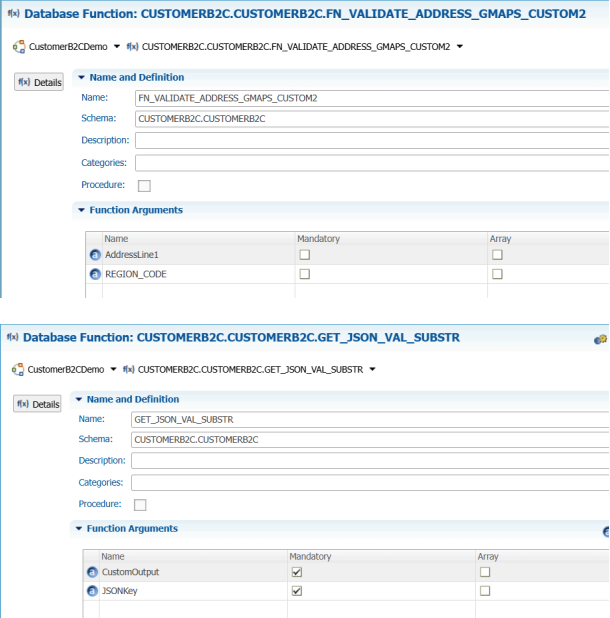
Fully Qualified name to be used in Schema.
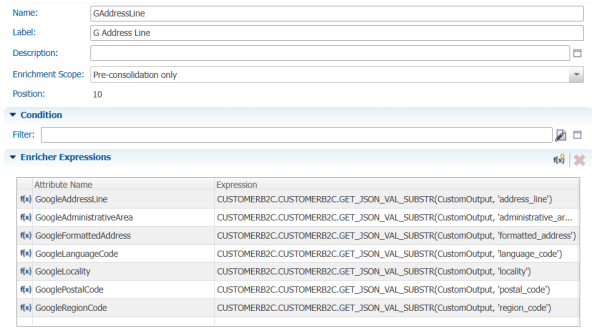
Step 2:Create attributes:
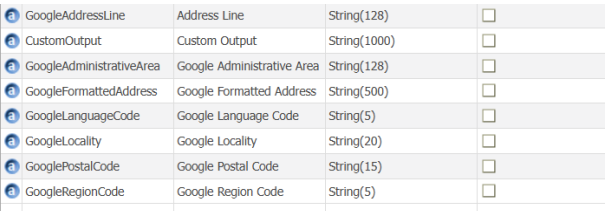
- GoogleAddressLine - Used in Enricher to CONCATENATE the address components.
- CustomOutput - Stores the JSON output from Google Function
- GoogleAttributes- Used to store data from JSON output
- CustomOutput is getting enriched in this enricher to call the function:
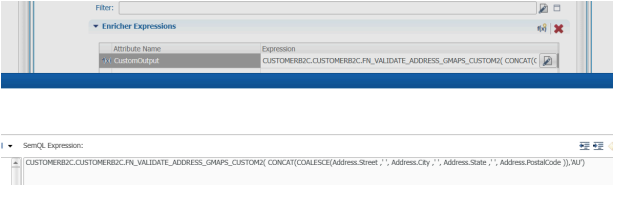
2. Enricher to extract the values from JSON output received in CustomOutput field:
Step 3: Add the attributes in UI
Add attributes to form/collection to preview the data in UI.
Step 4: Test the functionality by importing the data
Execute insert statement to test the functionality.