
Product: Semarchy Native App (xDM)
Version: 2025.1.12 or later
Author: Clément Darras, Matthieu Sanogho, Hélène Zosym
Need
Snowflake Managed PostgreSQL is now officially certified as a supported data location and repository backend for the Semarchy Native App. This opens the possibility for existing customers — typically those currently running the Native App with an embedded PostgreSQL repository and Hybrid Tables as a data location — to migrate to Snowflake Managed PostgreSQL.
Depending on the customer's requirements, the migration can cover:
- The repository only — data locations stay on Hybrid Tables.
- The repository and the data locations — both move to Managed PostgreSQL.
This article describes the recommended end-to-end migration process — covering data model migration, data migration, and repository migration — along with the prerequisites, risks, and operational considerations for each step. It is intended for Semarchy Support and Professional Services teams accompanying customers through this process.
Summarized Solution
- Decide the migration scope: repository only, or repository and data locations.
- If data locations change, rebuild the data model: export the XML, remove Hybrid Tables/Cortex AI-specific objects, and redeploy on the new Managed PostgreSQL data location.
- If data locations change, migrate the data out of Hybrid Tables into Managed PostgreSQL using Snowflake's native data-movement capabilities.
- Migrate the repository in four steps: back up the embedded repository, export it to
pg_dumpformat, restore it into Managed PostgreSQL, then switch the Native App to the external repository. - Expect application downtime during the final configuration switch — plan the migration outside production hours.
- Validate data integrity and full application behavior before retiring the embedded repository backups.
Detailed Solution
1. Migration Options
| Option | Repository | Data locations | Data model impact |
|---|---|---|---|
| 1 | Migrated to Managed PostgreSQL | Unchanged (stay on Hybrid Tables) | Migrates automatically with the repository — no adjustment needed |
| 2 | Migrated to Managed PostgreSQL | Migrated to Managed PostgreSQL | Must be adjusted and redeployed (see below) |
Confirm which option applies before starting, since it determines whether steps 2 and 3 below are needed.
2. Data Model Migration
If the data location does not change (Option 1), the data model migrates automatically together with the repository — no further action is required.
If the data location does change (Option 2), the data model must be adjusted:
- Export the XML from the existing Native App UI.
- Store it locally or in version control for backup purposes.
- Remove any DB functions specific to Hybrid Tables and any SQL usage of Cortex AI.
- Save the adapted version as XML.
- Prepare the target Managed PostgreSQL data location.
create user <data_location_user> with password '<data_location_password>';
grant <data_location_user> to snowflake_admin;
create schema <data_location_user> authorization <data_location_user>;
Note: You can follow steps 1 to 4 in this article if you are not sure how to correctly set up a Managed PostgreSQL instance for Semarchy NativeApp.
6. Deploy the new version of the model to this data location.
At the end of this step, the data location and data model are switched to Managed PostgreSQL.
3. Data Migration
If the data location does not change, this step can be skipped.
If the data location changes, move the data from Hybrid Tables (standard Snowflake tables) into the Managed PostgreSQL instance using pg_lake, the Postgres extension that Snowflake provides for data movement between Snowflake Postgres and Snowflake. This is documented officially in Moving data between Snowflake Postgres and Snowflake.
Note — Preview Feature. pg_lake–based data movement is currently a Preview Feature, available to all accounts but only on AWS and Microsoft Azure. Confirm the customer's cloud provider before relying on this approach.
You can also use another way your company has of moving data between two systems. We are describing in this article an example based on Snowflake native approach.
Snowflake documents three data-movement patterns; only two support writing data from Snowflake into Postgres (the direction needed for this migration):
| Pattern | Direction | Setup effort | When to use |
|---|---|---|---|
| Stages | Snowflake ↔ Postgres | Low — uses Snowflake-managed storage, no external bucket | Default choice for most migrations |
| Customer-managed S3 | Snowflake ↔ Postgres | Higher — requires an S3 bucket, IAM role, and storage integration | Large data volumes, or when the customer already manages their own S3 bucket |
| Shared Iceberg | Postgres → Snowflake only | Low | Not applicable here (read-only from Postgres into Snowflake) |
Recommended procedure using Stages (see Set up a Postgres stage and Move data between Snowflake and Postgres for full reference):
1. Confirm the target Postgres instance uses a STANDARD or HIGH MEMORY tier — data movement with pg_lake is not supported on BURSTABLE instances.
2. In Snowflake, create a storage integration pointing at the Postgres instance:
CREATE STORAGE INTEGRATION my_pg_stage_integration
     TYPE = POSTGRES_INTERNAL_STORAGE
     POSTGRES_INSTANCE = 'my_postgres_instance';
3. Create a Snowflake stage backed by that integration
CREATE STAGE my_pg_stage
     RELATIVE_URL = '/my_data'
     STORAGE_INTEGRATION = my_pg_stage_integration
4. On the Postgres instance, enable the pg_lake extension
CREATE EXTENSION pg_lake CASCADE;
5. In Snowflake, unload each Hybrid Table to an existing source stage (e.g. as Parquet):
 COPY INTO @<source_stage>
     FROM <hybrid_table>
     FILE_FORMAT = (TYPE = PARQUET);
6. Move the unloaded files from the source stage into the Postgres-backed stage:
COPY FILES
     INTO @my_pg_stage
     FROM @<source_stage>;
7. On the Postgres side, load the files into the target table:
COPY <table> FROM '@STAGE/my_data/data*.parquet';
8. Validate row counts and data integrity between the source Hybrid Table and the target Postgres table before decommissioning the Hybrid Table.
Warning: do not downgrade a Postgres instance from a higher tier to BURSTABLE while pg_lake data movement is configured — doing so without first removing the object-storage tables can cause data loss.
Warning: do not downgrade a Postgres instance from a higher tier to BURSTABLE while pg_lake data movement is configured — doing so without first removing the object-storage tables can cause data loss.
Further reading:
- Moving data between Snowflake Postgres and Snowflake (official documentation — patterns, setup, and access control)
- Hybrid tables overview (source table type being migrated from)
- Sync Data from Snowflake Postgres to Snowflake with Iceberg and pg_lake (developer walkthrough)
- Bidirectional Data Movement between SPG and SF with pg_lake — Internal Stage (end-to-end quickstart using internal stages, the pattern used above)
- CREATE STORAGE INTEGRATION (Postgres Internal Storage) (SQL reference)
4. Repository Migration
The repository migration follows four steps, regardless of which option was chosen.
Overview — 4 steps
- Step 1 — Backup the embedded repository
- Step 2 — Export to
pg_dumpformat- Step 3 — Restore into Managed PostgreSQL
- Step 4 — Reconfigure the Native App
Step 1 — Backup the embedded repository
Create a snapshot of the embedded repository using the backup procedure provided by the Native App. This snapshot is the reference save point before any operation
CALL <native_app_name>.XDM_PUBLIC.xdm_repo_backup(<snapshot_name>);
Step 2 — Export to pg_dump format
Once the snapshot is created, use the xdm_repo_dump procedure to generate a PostgreSQL dump in custom format. This procedure mounts the snapshot in a temporary SPCS container and runs pg_dump on the semarchy_repository schema. It is the first step to migrate from the embedded repository to an external one.
CALL <native_app_name>.XDM_PUBLIC.xdm_repo_dump(<snapshot_name>);
<snapshot_name>(mandatory): the name of an existing snapshot previously created withxdm_repo_backup. The dump mounts this snapshot read-only, starts a temporary PostgreSQL instance, and dumps it — the live repository is never impacted.
The procedure:
- runs only in embedded repository mode (returns an informational message otherwise);
- dumps only the
semarchy_repositoryschema (theextensionsschema and the databasesearch_pathmust be manually recreated at restore time — see below); - writes
<snapshot_name>.pgdump(lower-cased) to the@XDM_APP_SCHEMA.REPO_DUMPSstage and refreshes the stage directory. - In external repository mode,
xdm_repo_dumpreturns an informational message and has no effect.
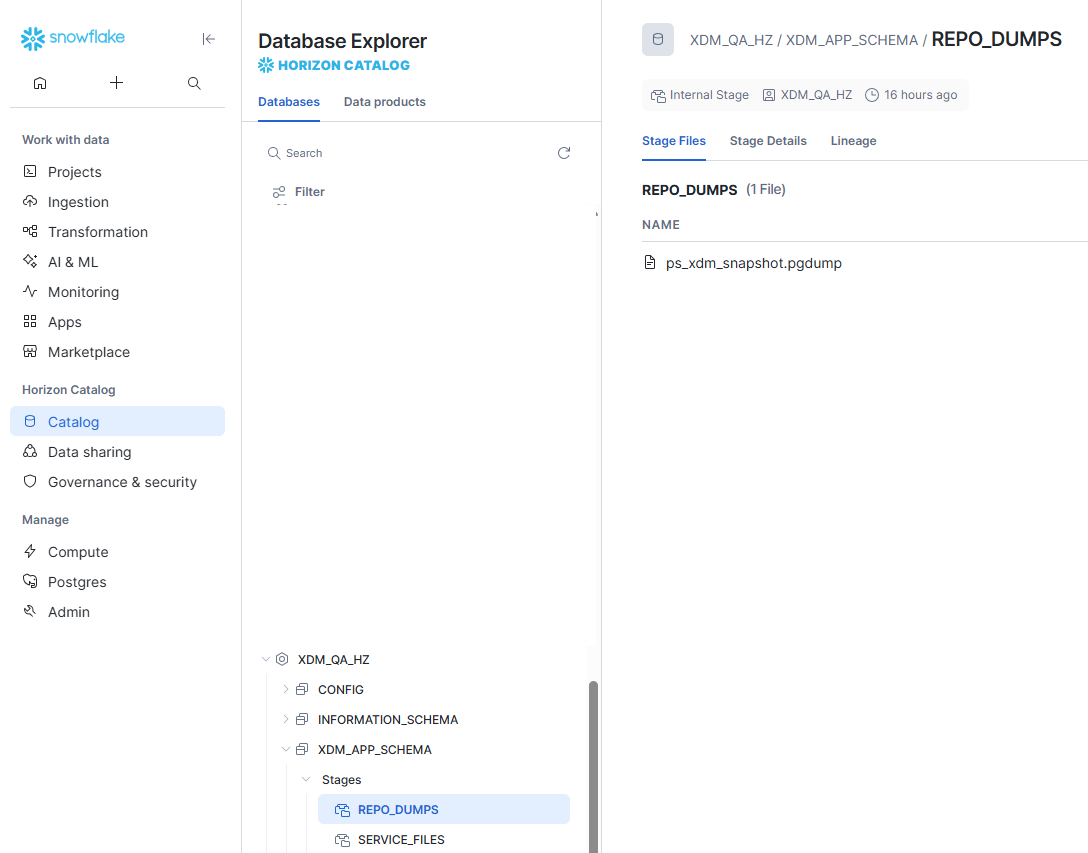
Download the dump locally with the Snowflake CLI (or Snowsight).
A. Snowsight UI:
- Go to Catalog - Databases Explorer
- Locate the NativeApp database (named the same as your app)
- Go to XDM_APP_SCHEMA - Stages - REPO_DUMPS
B. Snowflake CLI
- Open your command line tool on a machine where Snowflake CLI is installed and configured
- Run snow sql command to open interactive SQL command line
- Run the following command to get dump
USE DATABASE <native_app_name>;
GET @XDM_APP_SCHEMA.REPO_DUMPS/<snapshot_name>.pgdump file:///local/path/;
Step 3 — Prepare an external PostgreSQL and restore the dump
Restore the dump into the target Snowflake Managed PostgreSQL instance using standard PostgreSQL tools. These operations are performed outside Snowflake, against the target PostgreSQL instance, using a privileged administrator account (for example snowflake_admin on a Snowflake-managed PostgreSQL, where the built-in postgres superuser is not available).
Make sure that the network rules allows connection from your DBM tool to the given PostgreSQL instance. See Step 1. Prepare Network Rules in this article for more details.
3.1 — Manual prerequisites (run once, as the administrator)
The logical dump only contains the semarchy_repository schema. The repository role, the extensions schema, and the database search_path must all be created manually before restoring.
Apply the instructions regarding repository configuration described in Step 4. Create and configure databases for Semarchy NativeApp of this article.
Also apply the EAI configuration described in Step 6. Configure external access for Semarchy NativeApp of the same article.
3.2 — Restore the dump
Restore the semarchy_repository schema with pg_restore, forcing object ownership to the <repository_username> role via --no-owner --role. The administrator (snowflake_admin) was already made a member of that role in the prerequisites above, and the target schema already exists and is owned by <repository_username>, so no extra database-level grant is required:
pg_restore --no-owner --no-privileges \
    --role=<repository_username> --schema=semarchy_repository \
    -h <host> -p <port> -U snowflake_admin -d <database> \
    <snapshot_name>.pgdump
PostgreSQL version compatibility. The major version of pg_restore must be equal to or greater than the version used to create the dump. Verify compatibility before running the restore.
Step 4 — Switch from embedded to external repository
Once the restoration has been validated in Managed PostgreSQL, reconfigure the Native App to use the external repository via the switch_to_external_repo procedure
CALL <native_app_name>.XDM_PUBLIC.switch_to_external_repo(
    <repository_url>,
    [<repository_username>,]
    [<repository_password>,]
    [<repository_ro_username>,]
    [<repository_ro_password>]
);
Required parameters (mirror start_app_ext_repo):
| Parameter | Required | Description |
|---|---|---|
<repository_url> | Mandatory | JDBC URL of the external PostgreSQL hosting the migrated repository (e.g. jdbc:postgresql://myhost:5432/postgres) |
<repository_username> / <repository_password> | Optional | Repository user (semarchy_repository) credentials — stored as Snowflake Secrets |
<repository_ro_username> / <repository_ro_password> | Optional | Read-only user (semarchy_repository_ro) credentials — stored as Snowflake Secrets |
Procedure behavior:
- Before switching, the procedure automatically creates a safety snapshot of the embedded repository (via
xdm_repo_backup). - It verifies that the snapshot is in
CREATEDstate before proceeding. - It drops the embedded service and recreates it from the external repository spec — switching repository mode changes the volume layout, which Snowflake does not allow via
ALTER SERVICE, so the service must be recreated. - On failure, an automatic rollback is triggered: the embedded service is recreated and the block volume is restored from the safety snapshot.
- On success, the safety snapshot is automatically deleted.
The Native App URL changes after the switch. Because the service is dropped and recreated, Snowflake assigns it a new ingress URL. Retrieve the new URL with xdm_server_url() and update any bookmarks, integrations, or reverse-proxy configuration accordingly.
Switching discards the embedded repository data (the block volume is removed). The external PostgreSQL must already contain the migrated repository (dump restored) before calling this procedure. If the switch fails, the procedure automatically rolls back to embedded mode, recreating the service and restoring its data from the safety snapshot. If that automatic rollback also fails, the returned message includes the safety snapshot name so you can restore it manually with xdm_repo_restore.
xdm_server_url() and update any bookmarks, integrations, or reverse-proxy configuration accordingly.xdm_repo_restore.switch_to_external_repo only runs from embedded mode; in external mode it returns an informational message.
Typical end-to-end repository migration (summary)
-- 1. Dump the embedded repository and download it
CALL XDM_APP.XDM_PUBLIC.xdm_repo_backup('migration_snapshot');
-- 2. Reuse the snapshot created by the xdm_repo_backup to dump it
CALL XDM_APP.XDM_PUBLIC.xdm_repo_dump('migration_snapshot');
-- 3. Download dump locally
GET @XDM_APP_SCHEMA.REPO_DUMPS/migration_snapshot.pgdump file:///tmp/;

-- 4. Prepare the external PostgreSQL and restore
--    pg_restore --no-owner --role=semarchy_repository --schema=semarchy_repository \
--               -h myhost -p 5432 -U snowflake_admin -d postgres /tmp/migration_snapshot.pgdump

-- 5. Switch the native app to the external repository
CALL XDM_APP.XDM_PUBLIC.switch_to_external_repo(
    'jdbc:postgresql://myhost:5432/postgres',
    'semarchy_repository',
    'semarchy_repository',
    'semarchy_repository_ro',
    'semarchy_repository_ro'
);
Once this step completes, the system is in the migrated state and must be tested end-to-end.
5. Known Limitations and Considerations
Current technical limitations
- PostgreSQL extensions and
search_pathare not included in the dump — they must be configured manually on the target instance. - PostgreSQL version compatibility between the embedded container and Managed PostgreSQL must be verified before any migration.
- The
xdm_repo_dumpprocedure has no effect if the Native App is already in external repository mode. - If data locations change (Option 2), the
pg_lake-based data migration is a Preview Feature available only on AWS and Microsoft Azure, and requires a STANDARD or HIGH MEMORY Postgres instance tier (not BURSTABLE).
Expected downtime
- The
switch_to_external_repostep involves stopping the embedded PostgreSQL service — application downtime is expected. - Duration depends on the startup time of the new external connection service — typically short, but should be validated under real conditions.
- Plan the migration outside of production hours.
6. Migration Checklist
| # | Action | Status |
|---|---|---|
| 1 | Confirm the migration scope (repository only, or repository + data locations) | ☐ |
| 2 | If data locations change: export and adapt the data model (remove Hybrid Tables/Cortex AI-specific objects) | ☐ |
| 3 | If data locations change: migrate data from Hybrid Tables to Managed PostgreSQL | ☐ |
| 4 | Confirm the PostgreSQL version of the embedded container | ☐ |
| 5 | Provision the target Snowflake Managed PostgreSQL instance | ☐ |
| 6 | Pre-configure extensions, schema, and repository user on Managed PostgreSQL | ☐ |
| 7 | Run xdm_repo_backup | ☐ |
| 8 | Run xdm_repo_dump and download the file from the stage | ☐ |
| 9 | Restore the dump via pg_restore on the target instance | ☐ |
| 10 | Validate the restoration (data integrity in Managed PostgreSQL) | ☐ |
| 11 | Run switch_to_external_repo with the correct parameters | ☐ |
| 12 | Retrieve the new Native App URL via xdm_server_url() and update bookmarks/integrations | ☐ |
| 13 | Verify Native App startup and connections | ☐ |
| 14 | Validate full application behavior | ☐ |
| 15 | Retain embedded backups until final validation is complete | ☐ |
Best Practices Summary
- ✅ Confirm the migration scope with the customer before starting (repository only vs. repository + data locations).
- ✅ Back up the embedded repository before any operation.
- ✅ Validate PostgreSQL version compatibility between source and target before restoring.
- ✅ Plan the
switch_to_external_repostep outside production hours — it causes application downtime. - ✅ Retrieve and update the new Native App URL after the switch.
- ✅ Retain the embedded backups until the migration is fully validated.
- ❌ Never call
switch_to_external_repobefore the dump has been fully restored and validated on the target instance. - ❌ Never assume extensions or
search_pathare migrated automatically — they must be configured manually.
Following this process ensures a controlled, low-risk migration from the embedded PostgreSQL repository to Snowflake Managed PostgreSQL, with a clear rollback path at every step.