
Need
Semarchy Data Platform (SDP) projects rely on Design XP (DXP) - a collaborative, version-controlled development workflow, where multiple developers build and test changes locally before they are merged, reviewed, and deployed to shared environments through CI/CD. Without clear conventions, this collaborative model can introduce conflicts, deployment errors, and disruptions to shared environments.
This article describes the recommended end-to-end development and deployment workflow for SDP projects, the supporting infrastructure, and the associated best practices.
Summarized Solution
- Develop locally using a Build → Deploy cycle on an individual development data location before sharing changes.
- Commit and synchronize work regularly, resolving conflicts before raising a Pull/Merge Request.
- Require peer review of every Pull/Merge Request, with the team lead resolving any remaining conflicts before merging.
- Trigger deployment automatically through the CI/CD pipeline on merge — never deploy manually to shared environments.
- Host individual developer data locations on the same SDP environment using separate schemas/databases where supported.
- Protect branches so all changes flow through reviewed Pull/Merge Requests, not direct commits.
Detailed Solution
Note: SDP doesn't store your DXP file internally as it was for xDM, it fully relies on an external version control system. If you do not have a version control system, make sure to save your developments somewhere on a shared space to be able to recover those in case of an issue. Semarchy strongly recommends using a standard version control tool, such as GitHub, GitLab, Bitbucket etc.
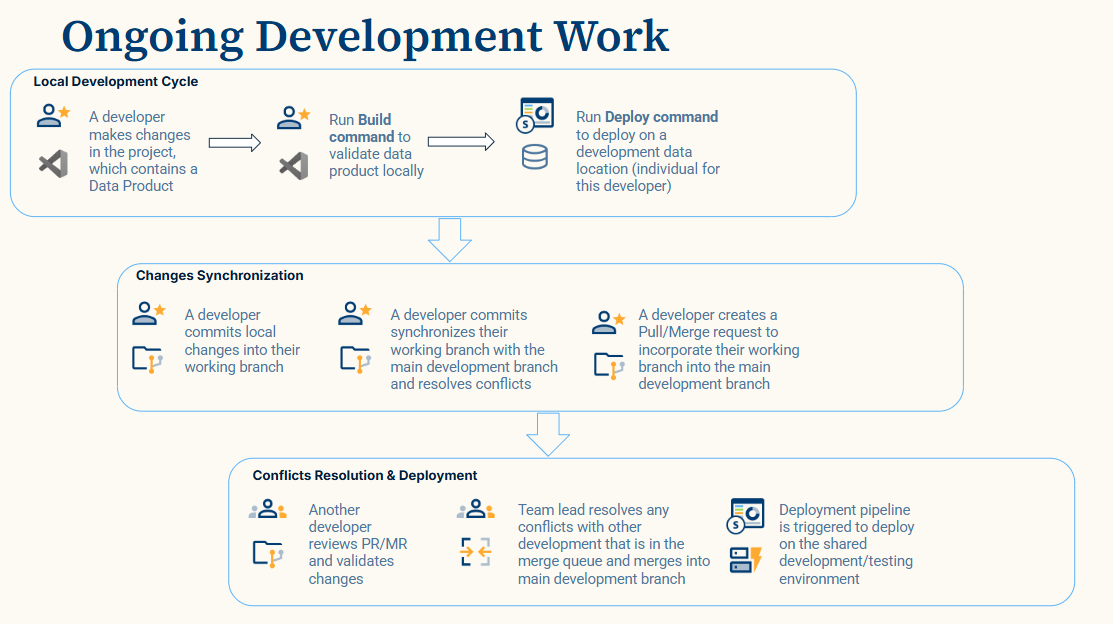
1. Local Development Cycle
Each developer works in their own task in the local VS Code environment:
- Make changes in the DXP project.
- Run the Build command to validate the data model locally.
- Run the Deploy command to deploy the changes to an individual development data location dedicated to that developer.
This local cycle lets developers validate their work in isolation before it affects anyone else.
2. Changes Synchronization
Once local changes are validated, the developer:
- Commits local changes into their own working branch.
- Synchronizes their working branch with the main development branch and resolves any conflicts that arise.
- Creates a Pull/Merge Request (PR/MR) to incorporate their working branch into the main development branch.
Synchronizing with the target branch before opening the PR/MR reduces the number of conflicts that reviewers need to deal with later.
3. Conflict Resolution and Deployment
Once a PR/MR is open:
- Another developer reviews the PR/MR and validates the changes (four-eyed review).
- The team lead resolves any remaining conflicts with other changes in the merge queue and merges into the main development branch.
- The deployment pipeline is automatically triggered to deploy the merged changes to the shared development/testing environment.
4. Collaborative Infrastructure
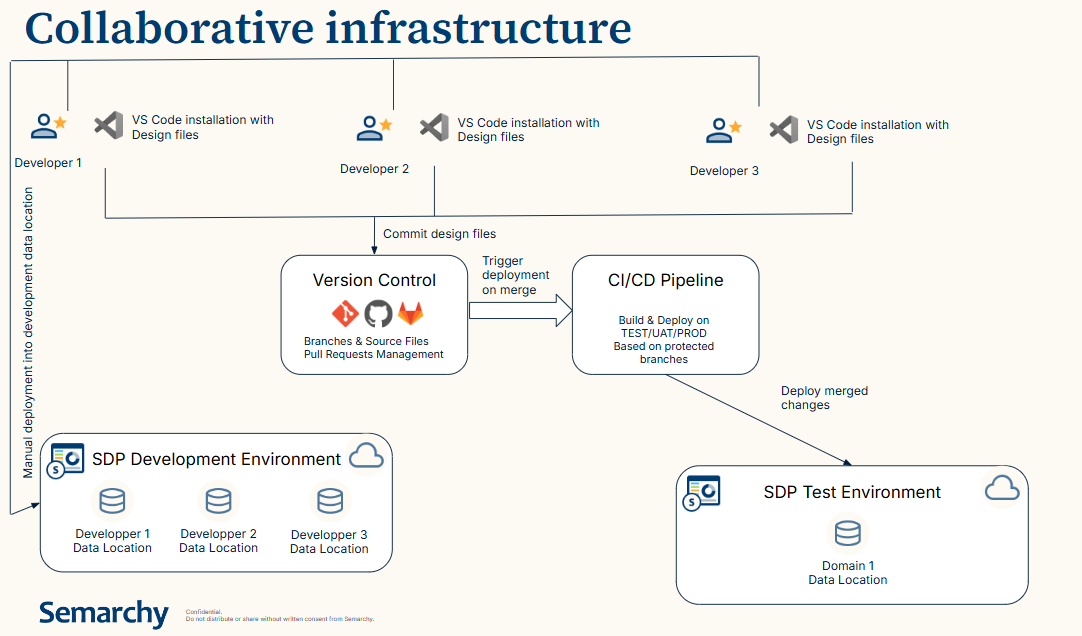
A typical SDP collaborative setup includes:
- Individual developer workstations, each with a VS Code installation containing the design files for that developer.
- Individual developer data locations, used to deploy and test each developer's local changes within the SDP Development Environment. We recommend to have one SDP installation for all developers and create separate data locations (DB schemas) for each developer to allow them test local development independently.
- A shared SDP Test Environment, including a domain-level data location used for shared testing. This environment can be accessed by the QA team or end-users participating in UAT to test the changes deployed.
- A Version Control system managing branches, source files, and Pull/Merge Requests.
- A CI/CD pipeline that builds and deploys to TEST/UAT/PROD based on protected branches, triggered automatically when changes are merged.
In this setup, developers commit design files to version control and manually deploy only to their own development data location; deployment to shared environments (TEST/UAT/PROD) is always handled by the CI/CD pipeline upon merge. This reduces human error and provides optimal security and audit trail in collaborative environment.
5. Collaborative Work Recommendations
- Individual developer data locations can all be hosted on the same SDP environment, using separate schemas or databases depending on what the underlying database technology supports.
- No direct commits should be authorized on protected branches, to avoid introducing errors or unvalidated changes.
- Deployment to shared environments must only be allowed through the CI/CD pipeline, to avoid disruptions caused by manual deployments.
- Synchronize individual branches with the target branch before opening a PR/MR, to reduce the number of conflicts reviewers need to resolve.
6. Typical data product lifecycle
Beyond the day-to-day local development cycle, SDP projects should organize their releases following a standard git flow branching model. This gives the data product a predictable lifecycle, with a clear separation between the currently released version, ongoing development, individual features, and urgent fixes.
masterbranch — contains the current valid release of the data product. It is only updated on the release date and is the branch deployed to PROD. Before each release, the previous state ofmasteris tagged to preserve a recoverable snapshot of the prior release.developbranch — the ongoing branch that accumulates all validated changes intended for the next release. On the release date,developis merged intomasterto produce the new release.- Feature branches — created from
develop, one per feature. A feature branch follows its own feature lifecycle (development, build/deploy validation, review) and is merged back intodeveloponce the feature is completed. - Urgent patch branches — created from the relevant version tag on
master(not fromdevelop) to correct a blocking issue outside the normal release cycle. Once the fix is validated, the patch branch is merged into bothdevelopandmaster, ensuring the correction is present in the current production release as well as in the next planned release.
7. Best Practices Summary
- ✅ Validate changes locally (Build → Deploy) before sharing them.
- ✅ Synchronize with the target branch before opening a PR/MR.
- ✅ Require peer review on every PR/MR.
- ✅ Let the CI/CD pipeline handle all deployments to shared environments.
- ✅ Share an SDP environment across developers using separate schemas/databases.
- ❌ Never commit directly to protected branches.
- ❌ Never deploy manually to shared TEST/UAT/PROD environments.
Following these practices keeps parallel development on SDP projects fast and low-risk, ensuring that only reviewed, conflict-free changes reach shared environments.