
Need
Semarchy Data Platform (SDP) through the new Design XP (DXP) supports granular design, allowing several developers to work in parallel on the same data model — and across multiple models — through clearly defined design roles. As development teams scale, organizations need clear guidance on how these roles are organized, how to manage branches, assign ownership, and apply development discipline so that parallel work does not introduce errors or bottlenecks.
This article summarizes the granular design roles and capabilities of SDP, the design environment used to support them, and the best practices for organizing large development teams around them.
Summarized Solution
- SDP design work can be organized around two complementary roles: Model Designer, responsible for the data product structure, data quality rules, and survivorship policies; and Application Designer (App Designer), responsible for the UI/UX design of the data product. You can also choose a different organization for your team based on the responsibilities and ownership in your organization.
- Design is performed in VS Code, which is compatible with standard market version control and collaborative work tools (e.g., Git-based platforms and CI/CD pipelines), allowing multiple designers to work on the same data product with defined ownership and a governed change process.
- Adopt a native, version-controlled branching and merging approach for data product design, organized by business domain.
- Manage a hierarchical branch structure based on business domain and feature level so teams can work as independently as possible.
- Apply the four-eyed principle to all code changes to reduce errors.
- Define code ownership and approval processes that differ by change type (entity structural changes, UI/UX changes, data quality rule changes).
- Follow general development best practices: regular commits/pushes, protected branches, and clear comments.
Detailed Solution
1. Granular Design Roles and Environment
In this article we explain how you can do an SDP's granular design organized around two complementary roles:
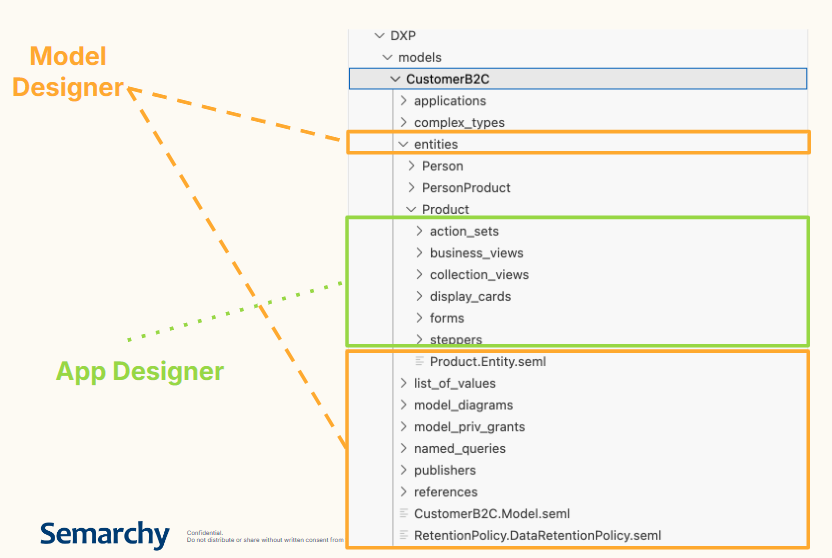
- Model Designer — responsible for the data product structure, data quality rules, and survivorship policies on a given data product.
- Application Designer (App Designer) — responsible for the UI/UX design of the data product.
Note: you can choose a different organization for your team based on the ownership and responsibilities in your project. We present here the simplest approach, but it can be applied to a bigger team with more roles.
Both roles design within VS Code, which is compatible with standard market version control and collaborative work tools, including Git-based platforms (e.g., GitHub, GitLab, Bitbucket) and CI/CD pipelines. This compatibility allows several people, in either role, to work on the same data model at the same time, each with defined ownership over their part of the design and a governance process for reviewing and approving changes. The new Design XP allows you to work with separate files for each object inside Data Product and cleanly separate changes.
2. Branching and Merging for Models
SDP provides a native, version-controlled approach to data product design. This lets teams design, test, and merge changes seamlessly, rather than working sequentially on a single shared model.
Note: SDP doesn't store your DXP file internally as it was for xDM, it fully relies on an external version control system. If you do not have a version control system, make sure to save your developments somewhere on a shared space to be able to recover those in case of an issue. Semarchy strongly recommends using a standard version control tool, such as GitHub, GitLab, Bitbucket etc.
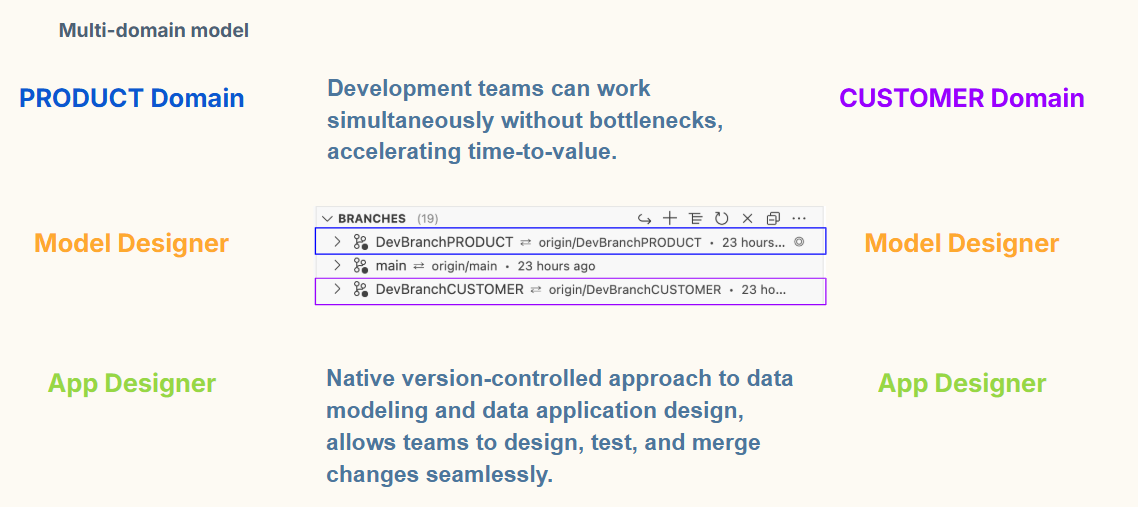
In a multi-domain model, separate domains (for example, a CUSTOMER domain and a PRODUCT domain) can each have their own Model Designer and Application Designer working on their respective design areas in parallel. Because changes are managed through branches:
- Development teams can work simultaneously without bottlenecks.
- Changes are isolated until merged, reducing the risk of one team's work blocking another's.
- Time-to-value is accelerated since teams no longer need to wait for a shared model to be free.
3. Organize Collaboration with a Hierarchical Branch Structure
To efficiently organize collaboration across large development teams, manage a hierarchical branch system based on:
- Business domain (for example, one branch family per domain such as CUSTOMER or PRODUCT).
- Feature level (sub-branches for specific features or changes within a domain).
This structure keeps teams as independent as possible, minimizing the number of conflicts between unrelated work streams.
4. Apply the Four-Eyed Principle
All code changes should go through a four-eyed review, meaning at least one person other than the author reviews and validates the change before it is merged. This significantly reduces the risk of errors reaching shared environments.
5. Define Ownership and Approval by Change Type
Not all changes carry the same risk, so approval processes should reflect that. Determine code ownership and approval requirements separately for:
- Entity structural changes (changes to the core data model).
- UI/UX changes (changes to the application layer presented to users).
- Data quality rule changes (changes to validation and quality logic).
Assigning clear ownership per category avoids ambiguity about who must review and approve a given change.
6. Apply General Development Best Practices
Regardless of team size, apply standard development discipline:
- Commit and push regularly to avoid losing work.
- Pull main branch regularly into feature branch to keep the working branch up-to-date.
- Protect branches to prevent accidental direct commits.
- Comment changes clearly, both in relevant parts of files and in commit messages, so reviewers and future developers understand the intent of a change.
7. Best Practices Summary
- ✅ Structure branches hierarchically by domain and feature.
- ✅ Require four-eyed review on all changes.
- ✅ Define ownership and approval rules per change type (structural, UI/UX, data quality).
- ✅ Commit and push regularly, with clear comments.
- ❌ Avoid direct, unreviewed commits to shared branches.
- ❌ Avoid flat, undifferentiated branch structures for large teams.
Following these practices allows large development teams to design, test, and merge changes on shared data models with minimal conflicts and maximum velocity.