
Need
In some scenarios, different integration jobs require different database connection settings, even though they operate on the same data location.
For example, you may want to:
- Allocate more memory to resource-intensive jobs such as initial loads.
- Apply database optimizer settings specific to a particular workload.
- Define session variables used by custom enrichers or SQL logic.
- Isolate specific integration jobs from the default datasource configuration without affecting other jobs.
Changing the default datasource is generally not desirable because it impacts every process using that data location.
To address this need, xDM provides the PARAM_DATASOURCE_NAME_SUFFIX job parameter, which allows an integration job to temporarily use an alternative datasource definition while leaving the default datasource unchanged.
Summarized Solution
The PARAM_DATASOURCE_NAME_SUFFIX parameter allows an integration job to use an alternative datasource that points to the same database but has different connection properties.
The implementation consists of:
- Creating a new datasource based on the existing one.
- Modifying its connection properties as required.
- Naming it using the original datasource name plus a suffix.
- Configuring the integration job with the
PARAM_DATASOURCE_NAME_SUFFIXparameter. - Deploying the model.
When the job starts, xDM automatically resolves the alternative datasource. If no matching datasource is found, it falls back to the default datasource associated with the data location.
Detailed Solution
How Datasource Overloading Works
Each data location is associated with a datasource.
By default, every integration job executed against that data location uses this datasource.
When the job parameter:
PARAM_DATASOURCE_NAME_SUFFIX
is defined, xDM attempts to locate another datasource by concatenating:
<OriginalDatasourceName> + <Suffix>
If this datasource exists, it is used instead of the default one for the duration of the integration job.
If no datasource matches the generated name, the integration job automatically falls back to the default datasource.
This mechanism allows multiple datasource configurations to coexist while sharing the same data location.
Typical Use Cases
Increasing PostgreSQL work_mem
One common use case is increasing PostgreSQL's work_mem parameter for large integration jobs.
The work_mem parameter controls the amount of memory available for operations such as:
- Sorting
- Hash joins
- Aggregations
- Hash key computation
When processing millions of records, increasing work_mem can significantly improve performance by reducing temporary disk writes.
However, increasing this parameter globally is generally not recommended because every database session would consume more memory.
Using a dedicated datasource allows only specific integration jobs to benefit from a higher work_mem value.
Adjusting Database Optimizer Parameters
Some database workloads benefit from optimizer settings that differ from the default configuration.
Examples include:
- Disabling merge joins
- Increasing the cost of sequential scans
- Adjusting
join_collapse_limitin PostgreSQL - Increasing
dynamic_samplingin Oracle - Enabling
SET STATISTICS_PROFILE ONin SQL Server
These settings can be applied through a dedicated datasource without impacting other workloads.
Defining Custom Session Variables
Some implementations rely on database session variables to control custom SQL logic or enrichers.
Using a dedicated datasource makes it possible to initialize these variables only for the jobs that require them.
Compatibility with Different Databases
Although the examples above use PostgreSQL, the same mechanism applies to any supported database platform.
The datasource can be customized to include any connection property supported by the corresponding JDBC driver.
Examples include:
- PostgreSQL
- Oracle
- SQL Server
- Other supported databases
Step 1 – Create a New Datasource
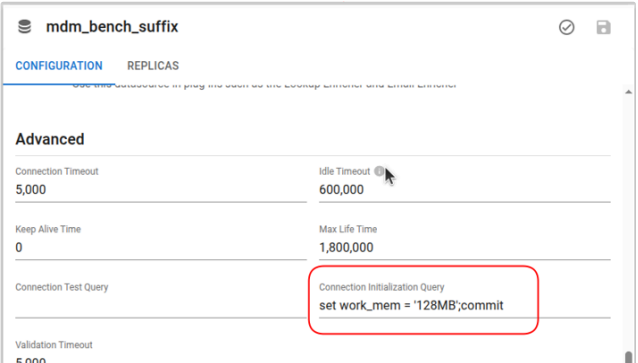
First, create a new datasource based on the existing one.
xDM
In the Administration interface:
- Open Configuration.
- Navigate to Datasources.
- Select the existing datasource.
- Use the Copy action.
- Modify the desired connection properties.
- Save the new datasource.
Self-hosted SDP
For self-hosted SDP deployments, use the Semarchy CLI.
Export the existing datasource:
sem dm admin datasources get <datasource-name> --json -o ds.json
Modify the exported ds.json file with the required connection properties.
Keep the password identical to the original datasource unless a different credential is required.
Create the new datasource:
sem dm admin datasources set <new-datasource-name> -i ds.json
Step 2 – Name the Datasource Correctly
The new datasource name must be based on the original datasource name with an additional suffix.
For example:
Original datasource:
CustomerDS
New datasource:
CustomerDS_BATCH
The suffix in this example is:
_BATCH
Datasource names must remain unique.
Step 3 – Configure the Integration Job
Open the integration job configuration.
Add the following parameter:
PARAM_DATASOURCE_NAME_SUFFIX
Set its value to the suffix used when naming the datasource.
Example:
| Parameter | Value |
|---|---|
PARAM_DATASOURCE_NAME_SUFFIX | _BATCH |
During execution, xDM will automatically resolve:
CustomerDS
to
CustomerDS_BATCH
Step 4 – Deploy the Model
After configuring the integration job:
- Save the model.
- Validate the model.
- Deploy it.
The integration job will now use the specialized datasource.
Fallback Behavior
If xDM cannot find a datasource matching:
<OriginalDatasourceName> + <Suffix>
it automatically uses the default datasource configured for the data location.
This makes the mechanism safe to implement incrementally, as existing jobs continue to work even if the alternate datasource has not yet been created.
Best Practices
- Use dedicated data sources only when specific jobs require different connection settings.
- Avoid changing global datasource properties solely to optimize a small subset of workloads.
- Give datasource suffixes meaningful names such as
_BATCH,_IMPORT, or_MATCH. - Validate new datasource configurations in a non-production environment before using them in production.
- Monitor database performance after introducing specialized datasource configurations to confirm that the desired improvements are achieved.