
Context
This Helm Chart aim to install all the prerequisites for Semarchy SDP SelfHosted on Kubernetes.
Usage should be limited to demonstration and test environment.
Here is the detail of the components installed:
• PostgreSQL
• OpenSearch
• Kafka
• SMTP Server
• Traefik Ingress Controller
Requirements:
To install and host the demo prerequisites and the dataplaform, you must sep up a Kubernetes cluster with the following ressources:
• Kubernetes version 1.32 - 1.35
• 4 vCPUs
• 16 GB of available RAM
• 10 GB of available disk space
• An active internet connection to retrieve software images
You will also need the following utilities:
• Helm version 3.18 or later
• Kubectl, at the same version as Kubernetes
The chart is tested with kind and Docker Desktop so some adaptation could be needed if you want to use it on other Kubernetes distributions (MiniKube, EKS, AKS …)
You can download the chart here.
Prepare the Helm Chart
Once the chart archive is downloaded, choose a folder and unzip it.
Change kind-config.yaml
apiVersion: kind.x-k8s.io/v1alpha4
kind: Cluster
nodes:
  - role: control-plane
    labels:
      ingress-ready: "true"
    extraPortMappings:
      - protocol: TCP
        containerPort: 30080    # Traefik HTTP NodePort
        hostPort: 80
      - protocol: TCP
        containerPort: 30432    # Postgres NodePort
        hostPort: 30432
      - protocol: TCP
        containerPort: 31080    # SMTP NodePort
        hostPort: 31080
You can adapt the PostgreSQL and SMTP container ports and host ports depending on the ports available on your host and on the container ports set in external-services/values.yaml.
Change external services values.yaml
Check all the comments to change the values in external-services/values.yaml
sdp:
  namespace: "sdpnamespace" # Adapt to the namespace where the SDP components will be deployed
# --- Postgres ---------------------------------------------------------------
postgres:
  enabled: true # Set to false if you want to use an external database
  init:
    keycloakPassword: "CHANGE_ME" # Set your own password here
    repoUserPassword: "CHANGE_ME" # Set your own password here
    repoUserReadOnlyPassword: "CHANGE_ME" # Set your own password here
    datasource1Password: "CHANGE_ME" # Set your own password here
    datasource2Password: "CHANGE_ME" # Set your own password here
  image: postgres:16
  db: selfhosted-dm
  user: semarchy
  password: changeme # Set your own password here
  service:
    port: 5432
    nodePort:
      enabled: true
      port: 30432 # Adapt to match kind-config.yaml containerPort
  persistence:
    enabled: true
    size: 10Gi
# --- Strimzi ---------------------------------------------------------------
strimzi:
  enabled: true
  # Have the operator watch just your namespace:
  watchAnyNamespace: true
# --- OpenSearch  -------------------------------------------------------------
opensearch:
  enabled: true # Set to false if you want to use an external OpenSearch cluster
  fullnameOverride: semarchy-opensearch
 # --- OpenSearch image (2.17+ as required) ---
  image:
    tag: "3.3.2"
  # Single-node dev setup (good for local / CI). For HA, set 3+ replicas & storage.
  replicas: 1
  extraEnvs:
    # Keep the security plugin enabled. If your chart supports this env, it sets the admin password on first start.
    - name: DISABLE_INSTALL_DEMO_CONFIG
      value: "false"
    - name: OPENSEARCH_INITIAL_ADMIN_PASSWORD
      valueFrom:
        secretKeyRef:
          name: opensearch-admin
          key: password # Set your own password here
  # Small default resources (tune for your cluster)
  resources:
    requests: { cpu: "250m", memory: "512Mi" }
    limits:   { cpu: "1",    memory: "2Gi" }
  # (Optional) persistence — enable for real environments
  persistence:
    enabled: true
    size: 2Gi
# --- Ingress  -------------------------------------
ingressDomain: sdp-selfhosted.local # Adapt to your local domain if it exists or set up your /etc/hosts accordingly
traefik:
  enabled: true # Set to false if you want to use an existing external ingress controller
  deployment:
    enabled: true
  ingressClass:
    enabled: true
    isDefaultClass: true
  service:
    enabled: false
  fullnameOverride: traefik
# --- SMTP  -------------------------------------
smtp:
  enabled: true           # Set to false if you want to use an external SMTP server
  persistence:
    enabled: false         # Whether to enable persistence (PVC)
    size: 1Gi             # PVC size if persistence is enabled
  service:
    nodePort:
      enabled: true       # Whether to expose the service via NodePort
      smtp: 30025         # SMTP NodePort
      http: 31080         # HTTP NodePort - Adapt to match kind-config.yaml containerPort
Change Secrets If Needed
If you want to use your own PostgreSQL, OpenSearch or SMTP server you can change the secrets file in external-services/templates folder accordingly.
| sdp-opensearch-secret.yaml | OpenSearch Provider Secret |
| sdp-postgres-dm-secret.yaml | PostgreSQL DM Secret |
| sdp-postgres-dmds1-secret.yaml | PostgreSQL datasource 1 Secret |
| sdp-postgres-dmdsS-secret.yaml | PostgreSQL datasource 2 Secret |
| sdp-postgres-keycloack-secret.yaml | PostgreSQL Keycloak Secret |
| sdp-smtp-secret.yaml | SMTP Mail Server Secret |
You can refer to the official documentation to check how to fill the secrets.
Change /etc/hosts
In a local context, it is necessary to add a route for the application to be properly configured.
For Windows :
Type the following command
$ cd C:\Windows\System32\drivers\etc\
$ explorer .
Then open the file hosts with notepad and adapt this line replacing sdp-selfhosted with the domain configured in values.yaml and save
127.0.0.1 sdp-selfhosted.local selfhosted.sdp-selfhosted.local
For Linux or MacOS:
Change the /etc/hosts file and adapt this line replacing sdp-selfhosted with the domain configured in values.yaml and save
127.0.0.1 sdp-selfhosted.local selfhosted.sdp-selfhosted.local
Change SDP values.yaml
You need to adapt you main SDP values.yaml to your domain defined in external-services/values.yaml in ingressDomain tag.
Change the above values accordingly:
global.domain
global.externalProtocol: "http"
global.logCollector.tls and tls_verify: "off"
tenant-settings.user_creation
semarchy-iam.keycloak.config.spi.eventsListenerKafkaEventListenerPropertiesSecurityProtocol: SASL_PLAINTEXT
semarchy-iam.ingress.hosts.host and .path.className
log-explorer.ingress.hosts.host and .path.className
user-profile.ingress.hosts.host and .path.className
site-admin.ingress.hosts.host and .path.className
welcome.ingress.hosts.host and .path.className
dm.core.ingress.hosts.host and .path.className
dm.core.passive.replicaCount: 1
You can set more than one passive node, if so, please enable sticky sessions with traefik in dm.core.passive.service.annotations.
Add external registries
Before running the chart you need to add some registries to helm in order to be able to download the subchart automatically.
Type the following command once :
helm repo add traefik https://traefik.github.io/charts
helm repo add strimzi https://strimzi.io/charts/
helm repo update
cd external-services
helm dependency update .
Install External Services Helm Chart
Open a terminal, a cmd prompt or a PowerShell terminal then go to your archive folder.
cd /path_to_archive
Create Cluster
If you don’t have any Kubernetes cluster installed, you can create one using kind with the following command :
kind create cluster --name sdp --config kind-config.yaml
If you have an existing cluster you need to ensure that the following port are redirected :
• Traefik
◦ TCP containerPort 30080 -> hostPort 80
• PostgreSQL
◦ TCP containerPort 30432 -> hostPort 30432
◦ Can be changed within values
• SMTP
◦ TCP containerPort 31080 -> hostPort 31080
Check the context used by kubernetes:
kubectl config get-contexts
Create Namespaces
You will need two namespaces to install SDP SelfHosted, one for external-services and one for the core SDP components.
Remark : the name of the SDP component namespace need to match the values set in external-services.yaml, tag sdp.namespace
Run the following command to create namespaces :
kubectl create ns sdp-external-services
kubectl create ns sdpnamespace
Install External Services
Use helm to install all external services automatically :
cd external-services
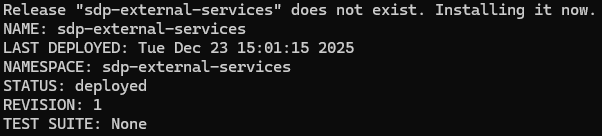
helm upgrade --install sdp-external-services . -n sdp-external-services -f values.yaml --timeout 60m
Remark : You can change the release name after –-install option and adapt the namespace for external services after -n option
You should have an output like :
Check your external services installation
Run the following command :
kubectl -n sdp-external-services get deploy,svc,pods,pvc,pv,ingress,job
You should have an output like :
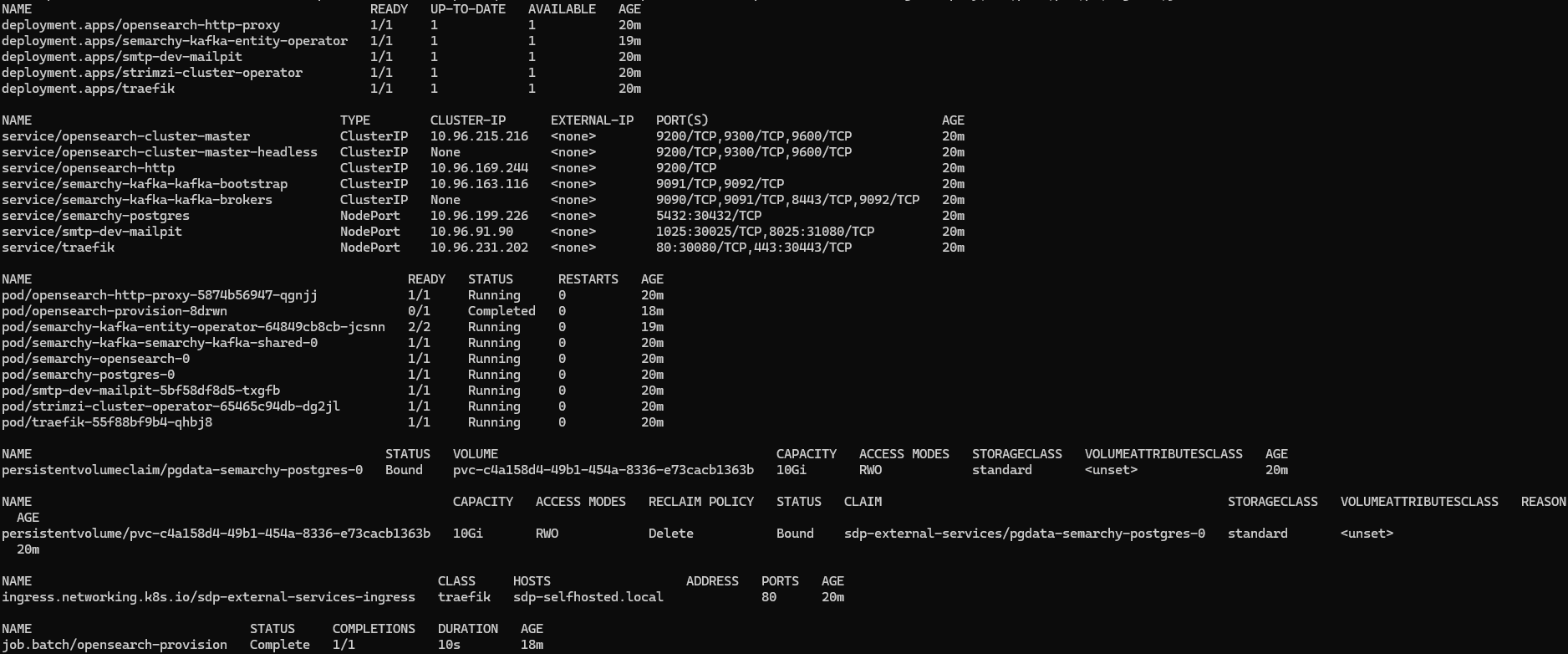
You can check SMTP server using browser : http://localhost:31080

You can check PostgreSQL using any SQL client with the credentials defined in external-services/values.yaml on localhost:30432.
Install SDP Helm Chart
To install SDP you can follow the documentation and skip “Set up external services”. Some secrets are already present (according to the prerequisites that are enabled), nonetheless the registry secret is needed.