
This article explains how to generate an XML file with repeated nodes using Semarchy XDI designer, ensuring that certain nodes are repeated as needed.
Need
The primary need is to create an XML file where certain nodes are repeated under a parent node. This is particularly useful when dealing with data that needs to be represented in a hierarchical XML structure.
Summarized Solution
To produce an XML file with repeated nodes, set a node as a key and map the source value that matches the unique values for iteration. This ensures that the XML structure is generated correctly with the desired repetitions.
Detailed Solution
a. Set Up the XML Structure
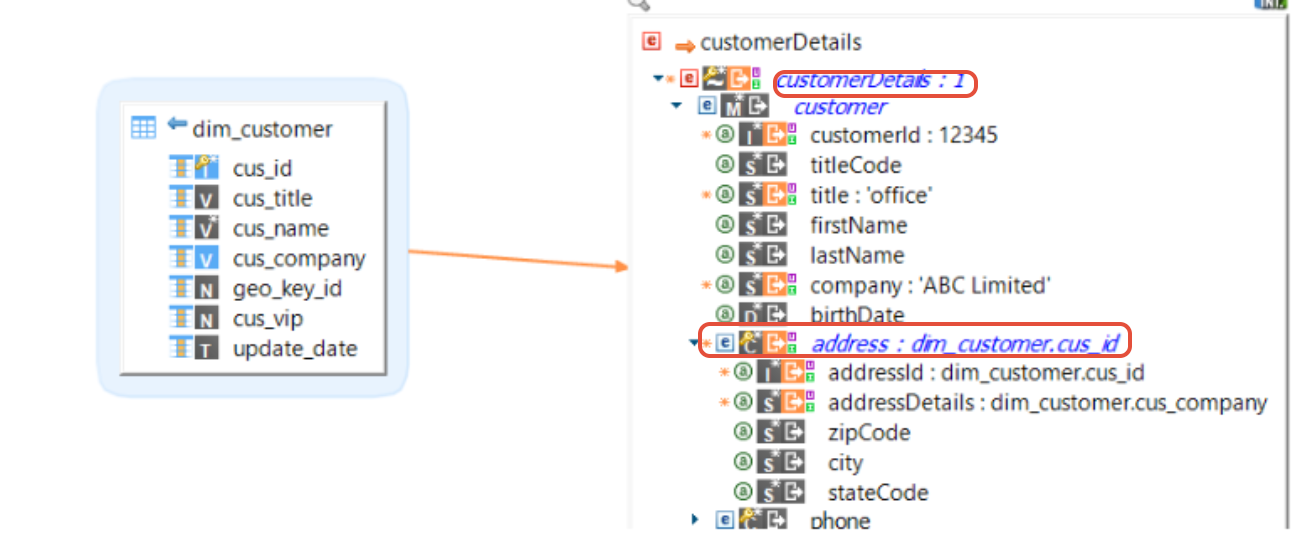
- Ensure the root node(CustomerDetails) is set to "Use as key" with a constant value if a single file is desired, or map it to a source column for multiple files.
- Map the repeating nodes to the source column and set them to "Use as key" to enable iteration.
b. Map the Source Values
- Map the source values to the appropriate nodes and attributes within the XML structure.
- Ensure that the parent node(address) is set as the key for iteration.
c. Verify the XML Output
After setting up the mapping, verify that the XML file is generated with the correct structure and repetitions as expected.

Note: Ensure that the root node is set to "Use as key" with a constant value if a single file is desired, or map it to a source column for multiple files.
Always verify the XML output to ensure it matches the expected structure