
Need
When importing data into a Semarchy model, text attributes may contain special characters like double quotes ("), which can cause issues during the import process. Specifically, if a field contains a double quote, the system wraps the data until the next quote, leading to problems with how the data is parsed. The challenge is to clean the data before the import completes to prevent errors caused by these special characters.
Summarized Solution
To solve this issue, a database function can be created to automatically remove special characters from text attributes before they are fully imported. This function can be triggered during the import process, ensuring that no special characters remain in the data. The function works by identifying and replacing non-word characters (such as quotes) in the specified fields.
Detailed Solution
- This method assumes that special characters are limited to those defined in the regular expression (
[^\w]+). If other specific characters need to be removed or preserved, modify the regular expression accordingly. - Ensure the function is tested on a small dataset before applying it to production to avoid unintended data changes.
Step 1: Create a Function in the Database
A function is created in the database that will check for special characters in the specified field and remove them. Below is the SQL code for the function:
CREATE OR REPLACE FUNCTION semarchy_emp_tutorial5.remove_special_char(loadids numeric)
RETURNS void
LANGUAGE plpgsql
AS
$function$
BEGIN
    UPDATE semarchy_emp_tutorial5.sa_new_1
    SET "name" = regexp_replace("name", '[^\w]+', '', 'g')
    WHERE b_loadid = loadids;
END;
$function$;
This function uses the regexp_replace command to remove any characters that are not letters, numbers, or underscores from the name field. This ensures that no special characters, like double quotes, remain in the data.
Step 2: Declare the Function in Semarchy App Builder
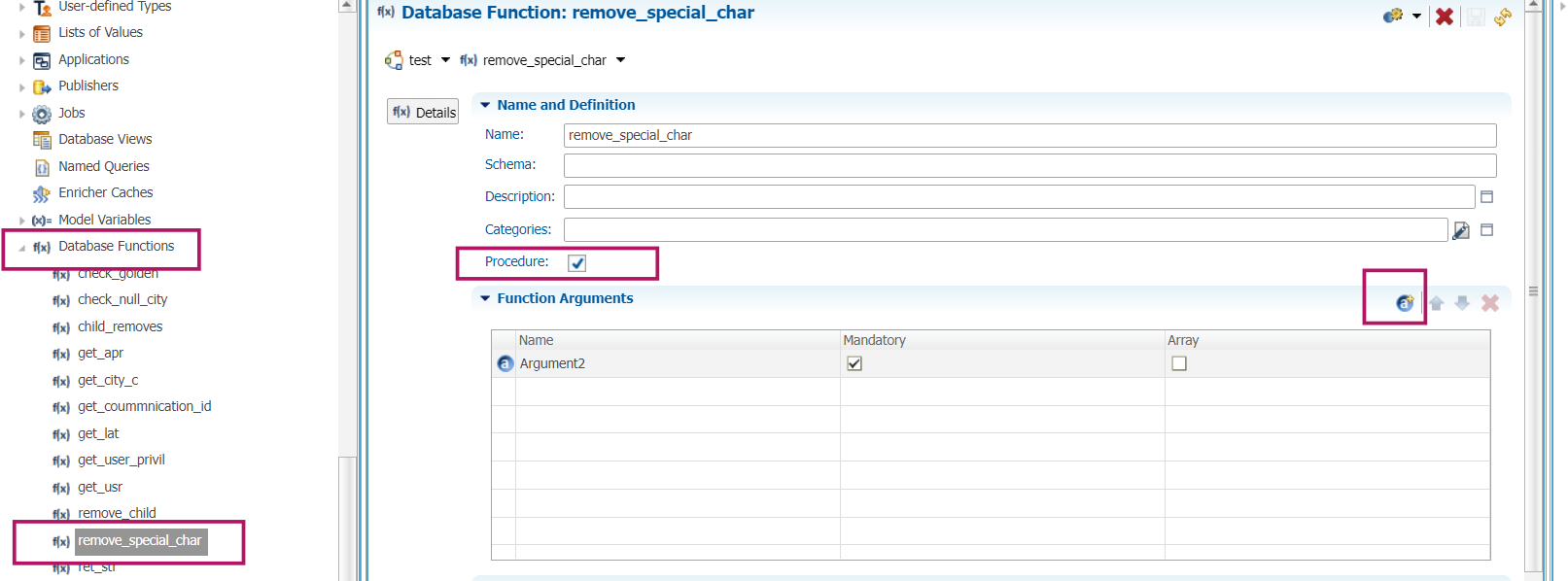
- In App Builder, go to the Database Functions section.
- Create a new function called
remove_special_char. - Ensure the Procedure checkbox is selected.
- Add the necessary argument (e.g.,
loadids) and mark it as mandatory. - Save the function.
Step 3: Attach the Function to the Import Process
- Navigate to the Stepper section where the import process is configured.
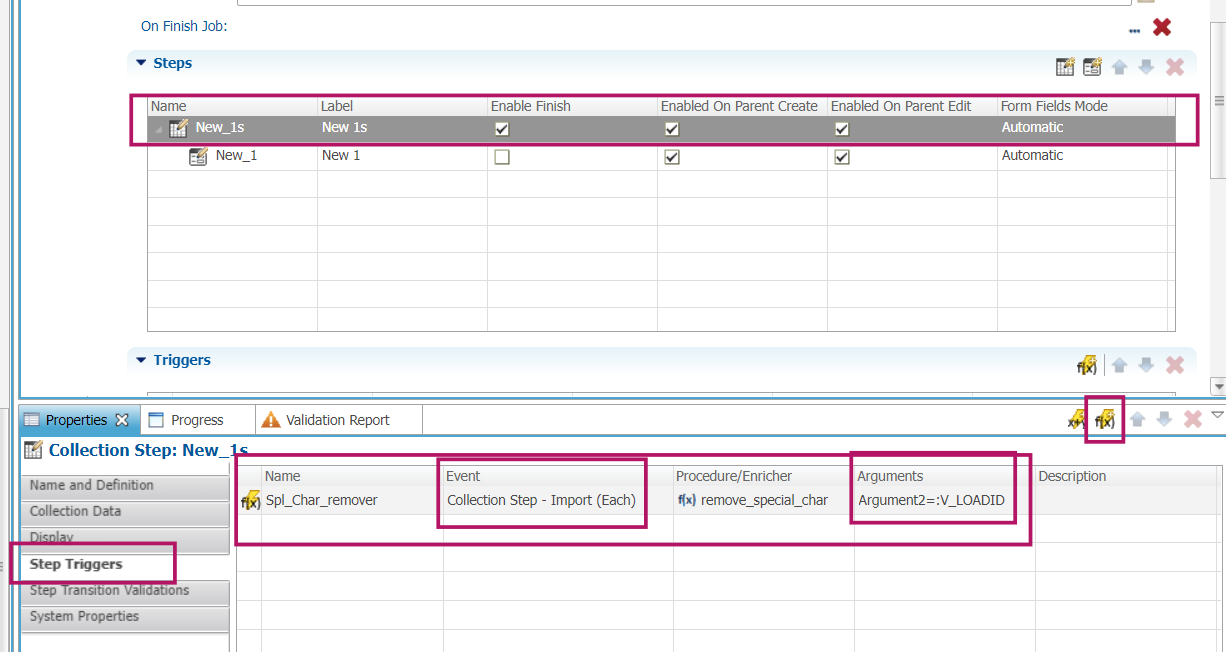
- Select the Collection Step and scroll to the Step Triggers section.
- Click the Fx button to add a Step Procedure Trigger.
- Select the
remove_special_char function from the list. - For the Event, choose Import (Each), ensuring the function is executed for each data import.
- In the Argument field, pass the value
:V_LOADID to ensure the function processes the correct load.
- Modify the regular expression in the function to adapt to your specific needs (e.g., removing only certain special characters).
- You can use this method for any text field, not just the
name field as shown in the example.
- This method assumes that special characters are limited to those defined in the regular expression (
[^\w]+). If other specific characters need to be removed or preserved, modify the regular expression accordingly. - Ensure the function is tested on a small dataset before applying it to production to avoid unintended data changes.
CREATE OR REPLACE FUNCTION semarchy_emp_tutorial5.remove_special_char(loadids numeric)
RETURNS void
LANGUAGE plpgsql
AS
$function$
BEGIN
UPDATE semarchy_emp_tutorial5.sa_new_1
SET "name" = regexp_replace("name", '[^\w]+', '', 'g')
WHERE b_loadid = loadids;
END;
$function$;This function uses the regexp_replace command to remove any characters that are not letters, numbers, or underscores from the name field. This ensures that no special characters, like double quotes, remain in the data.
Step 2: Declare the Function in Semarchy App Builder
- In App Builder, go to the Database Functions section.
- Create a new function called
remove_special_char. - Ensure the Procedure checkbox is selected.
- Add the necessary argument (e.g.,
loadids) and mark it as mandatory. - Save the function.
Step 3: Attach the Function to the Import Process
- Navigate to the Stepper section where the import process is configured.
- Select the Collection Step and scroll to the Step Triggers section.
- Click the Fx button to add a Step Procedure Trigger.
- Select the
remove_special_charfunction from the list. - For the Event, choose Import (Each), ensuring the function is executed for each data import.
- In the Argument field, pass the value
:V_LOADIDto ensure the function processes the correct load.
- Modify the regular expression in the function to adapt to your specific needs (e.g., removing only certain special characters).
- You can use this method for any text field, not just the
namefield as shown in the example.