
Need
In collaborative environments, multiple users may access and modify the same record simultaneously. This can lead to unintended data overwrites or inconsistencies.
Example scenario:
- User A starts a stepper to edit a car record and changes the color from red to black, but does not complete the stepper. The draft is saved for later.
- User B opens the same record in the same stepper, changes the color from red to grey, and completes the stepper (saves the changes).
- When User A returns and completes the stepper, the golden record is updated to black, without any warning or notification that the record was modified in the meantime.
In this case, the system does not detect or warn about concurrent modifications. This creates a risk of overwriting validated changes without visibility.
A similar risk exists in Duplicates Manager, where users can add golden records from another load using the "+" action. Without restrictions, users may unintentionally merge records that are currently being processed in another load.
While a workaround such as copying and validating the originating load ID is possible, implementing custom validation logic for every workflow or stepper is not ideal.
The objective is therefore to:
- Minimize concurrent editing conflicts.
- Restrict record additions across active loads.
- Avoid heavy custom solutions for each workflow.
Summarized Solution
Two complementary approaches can reduce or prevent concurrent conflicts:
1. Restrict record selection in Duplicates Manager:
- Implement a database function that detects if a record is currently being edited (i.e., part of a running load).
- Create a custom search form that filters out records currently in a load.
- Enable this search form in Duplicates Manager.
- Disable all other search options to enforce controlled selection.
2. Display and/or enforce a concurrent editing indicator:
- Implement a database function that detects if a record is currently being edited (i.e., part of a running load).
- Display an indicator in a collection column.
- Optionally, use the same function in the Edit Action configuration to prevent editing when a record is already in use.
These approaches improve data safety without requiring custom validation logic in every workflow.
Detailed Solution
As mentioned in the summarized solution, the starting point of both options is to create a database function that detects if a record is currently being edited (i.e., part of a running load).
This is achieved by calling a custom database function that checks whether the record is linked to a batch with status RUNNING.
PostgreSQL example:
create or replace function usr_get_change_indicator(p_id numeric)
returns text
language plpgsql
as $function$
declare
  ret text;
begin
    select string_agg(
             b.b_loadcreator || ' (' || b.b_loadid || ')',
             ', '
             order by b.b_loadid
           )
    into ret
    from sa_my_entity me
    inner join dl_batch b
        on b.b_loadid = me.b_loadid
    where me.id = p_id
    and b.b_status = 'RUNNING';
  return ret;
end
$function$;
Oracle equivalent:
select LISTAGG(
         D.B_LOADCREATOR || ' (' || D.B_LOADID || ')',
         ', '
       ) within group (order by D.B_LOADID)
from SA_PRODUCT P
inner join DL_BATCH D
    on P.B_LOADID = D.B_LOADID
where P.ID = &p_id
and D.B_STATUS = 'RUNNING';
This function:
- Accepts the record ID as input.
- Checks whether the record belongs to a batch with status RUNNING.
- Returns a comma-separated list of users currently editing the record.
Don't forget to then declare this function in your model.
1. Restricting Record Additions in Duplicates Manager
The "+" action in Duplicates Manager allows users to search and add golden records for merging. By default, this may include records currently part of a load.
To reduce risk:
Step 1 - Create a Custom Search Form
Create a custom search form that filters out records currently in a load.
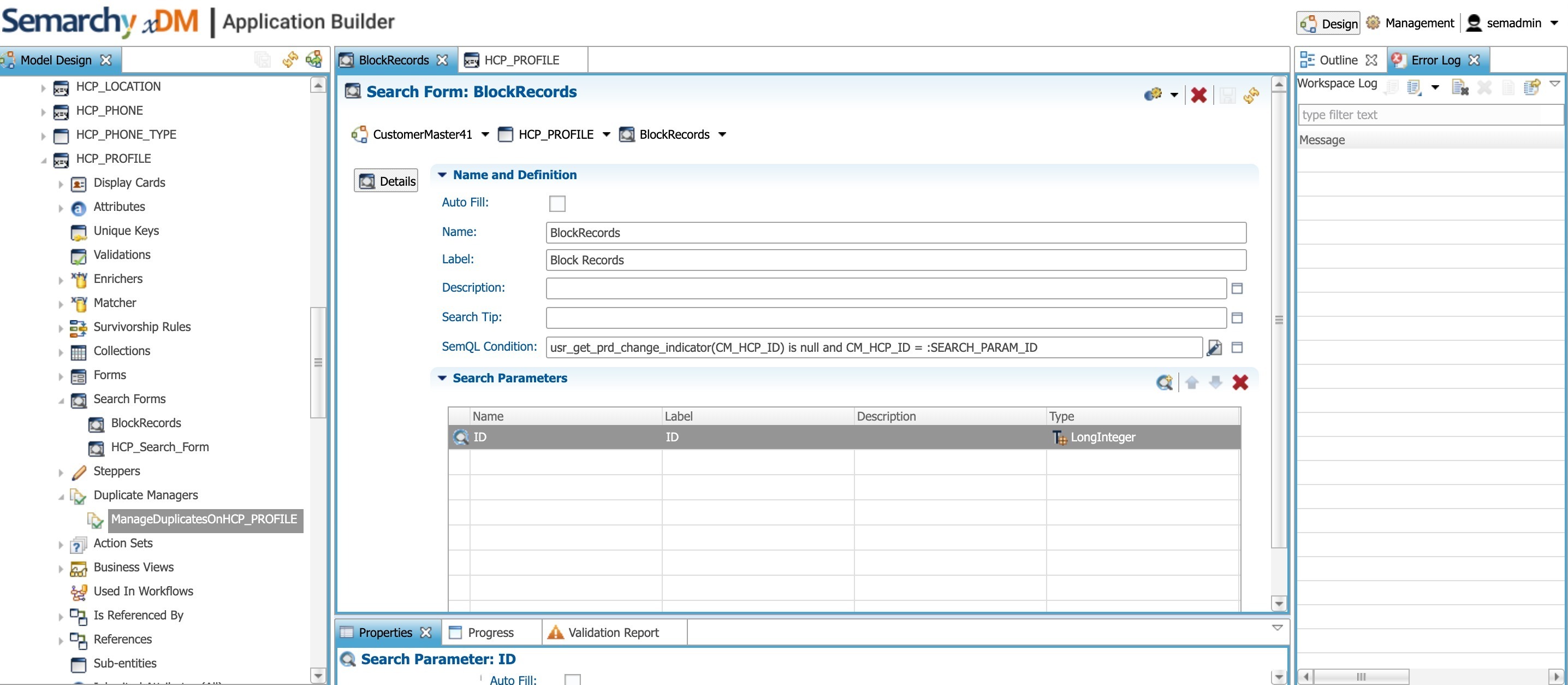
Example SemQL condition:
case
  when usr_get_change_indicator(Gold_CM_HCP_ID) is not null
  then 'md:red 50'
end
You may adapt the input parameters and filtering logic depending on the use case.
Step 2 - Enable the Custom Search Form
- Enable this search form in Duplicates Manager.
- Disable all other search options.
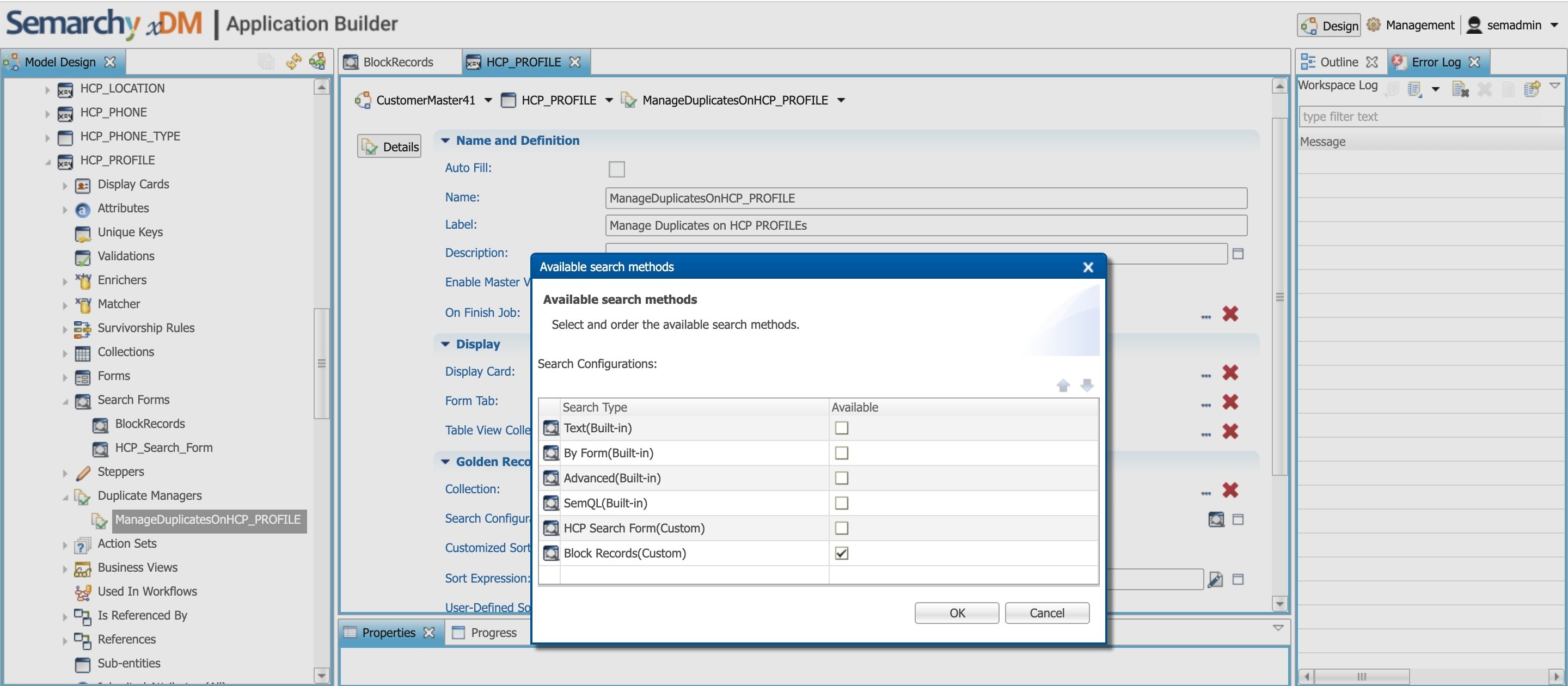
This ensures users can only add records that meet the defined filter condition (e.g., not currently in an active load).
2. Displaying a Concurrent Editing Indicator
Another approach is to display an indicator showing that a record is currently being edited in a running load.
The function created above can be called in a collection column.
If the function returns a value, the UI can display a visual indicator warning that the record is currently being edited by another user.
For many use cases, displaying this indicator is sufficient to prevent accidental overwrites.
3. Enforcing Edit Prevention (Optional but Recommended)
To go further, you can use the same function in the Edit Action Configuration:
- Add a condition that checks whether the function returns a value.
- If it does, prevent the Edit action from being executed.
This ensures that:
- A second user cannot start editing a record that is already part of a running load.
- Concurrent modification risks are significantly reduced.
Additional Note
There is an existing enhancement request titled: "Display concurrent change indicator in browsing".
If relevant, customers requesting this behavior can be associated with this enhancement.