
Need
In some integration scenarios, REST API consumers need access to a binary attribute (such as an image, document, or file) stored in Semarchy.
However, sending the full binary content directly in the API response may:
- Increase payload size significantly.
- Impact performance.
- Be unnecessary when the consumer only needs access to the file.
- Create constraints for embedding content in external applications.
The requirement is therefore to allow API consumers to access binary content without including the binary itself in the REST response.
/!\ Important:
The generated binary URLs rely on an authenticated browser session. This means the approach works well for interactive UI-based usage, but it is not suitable for unattended API integrations or server-to-server access patterns.
Summarized Solution
Instead of returning the binary content, you can return a direct URL pointing to the binary resource.
This is achieved by:
- Creating a Hyperlink form field based on the binary attribute.
- Retrieving the generated binary URL.
- Reusing that URL structure inside a Named Query (SemQL expression).
- Returning the generated link in the REST API response.
The REST consumer then uses this link to access the binary content directly, without the binary being embedded in the API payload.
/!\ Important:
The generated URL relies on an active authenticated UI session (browser cookies/session context). It is therefore intended for interactive authenticated users and not for unattended integration runtimes such as xDI or external backend services.
Detailed Solution
1. Generate the Binary Resource URL
- Add your Binary attribute to a Form.
- Configure it as a Component Type: Hyperlink.
- Browse a record and click the hyperlink.
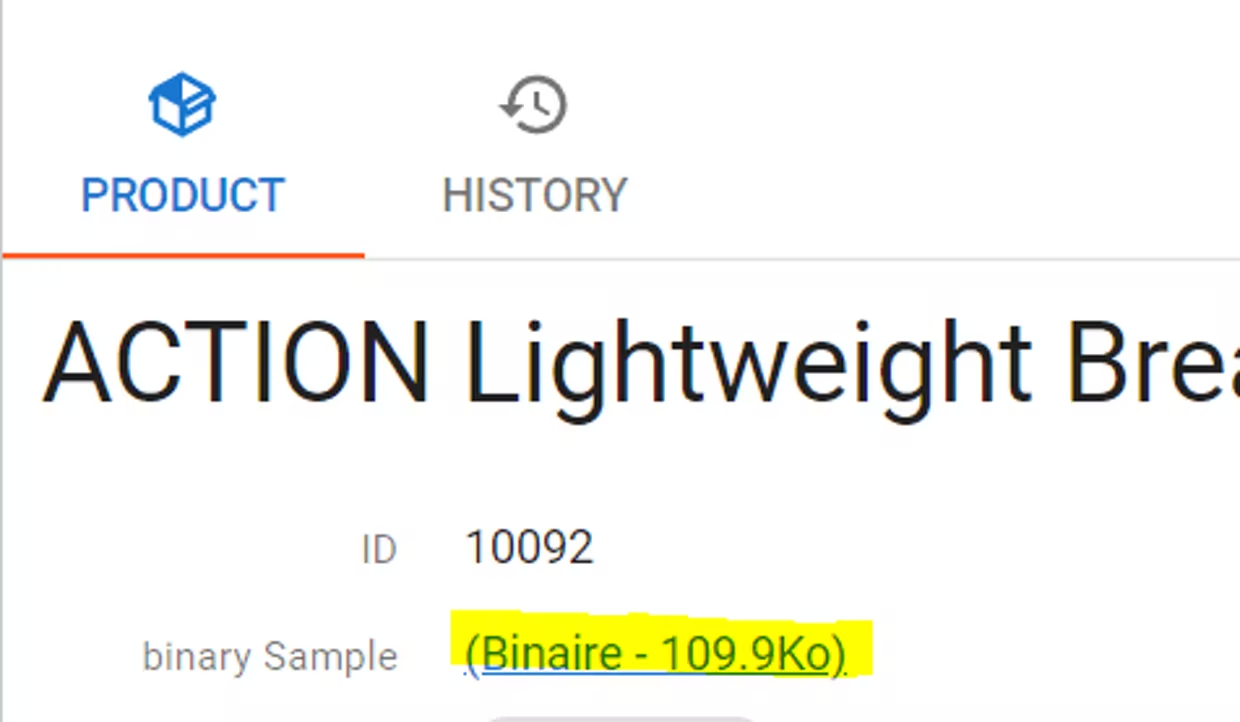
When clicking the link, you will see that it points to a URL structured like this:
:V_SERVER_BASE_URL || '/binaryResource?dlocName=' || :V_DATALOCATION
|| '&entityName=Product'
|| '&viewType=GD'
|| '&selectExpression=binarySample'
|| '&recordId=%7B%22ID%22%3A' || ID || '%7D'
|| '&hash=3303'
This URL is the direct access path to the binary content.
2. Reuse the URL in a Named Query
You can reuse this URL pattern inside a Named Query using a SemQL expression.
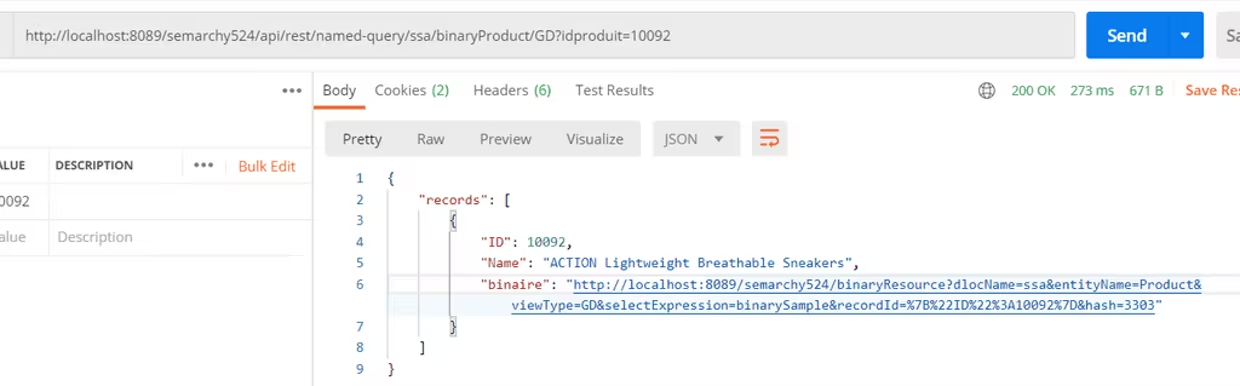
The Named Query will dynamically generate the binary link for each record and include it in the REST response body.
Instead of returning the binary content itself, the API response will contain something like:
{
  "id": 1001,
  "name": "Product A",
  "binaryLink": "https://server/binaryResource?dlocName=..."
}
3. Use the link in external applications
The generated link can be:
- Embedded in web or mobile applications
- Used in <img> tags
- Opened in a browser
- Consumed by third-party systems
The important point is: the binary content is not sent through the REST API response.
Only the hyperlink is shared.
The actual binary is retrieved only when the link is called.
This approach optimizes performance and keeps API payloads lightweight while still enabling full access to the binary content.
Important note: Authentication and Endpoint Limitations
The generated binary URL uses the internal endpoint which relies on an authenticated browser session.
As a result:
- The link works correctly when opened from:
- An active xDM UI session
- An authenticated browser tab
- A browser carrying valid session cookies
- The link fails when called from:
- Postman without authentication cookies
- xDI runtime
- Incognito/private browser sessions
- External backend integrations
- Server-to-server REST calls
In those cases, the response returned is:
{
  "message": "Full authentication is required to access this resource"
}
This behavior is expected because:
- /api/internal-dataui/binaryResource is an internal UI endpoint.
- It is designed for authenticated UI access.
- It is not intended as a supported public integration API endpoint.
Even when providing:
- API keys
- REST authentication headers
The endpoint still requires a valid authenticated user session and browser session context.
/!\ Because of this dependency on UI authentication, this solution should not be considered suitable for:
- Unattended integrations
- xDI jobs
- External middleware polling binaries
- Background services
- Machine-to-machine integrations
Instead, this approach is best suited for:
- Interactive web applications
- Embedded hyperlinks in UI applications
- Authenticated end-user navigation
- Browser-based access to binary content
Need
In some integration scenarios, REST API consumers need access to a binary attribute (such as an image, document, or file) stored in Semarchy.
However, sending the full binary content directly in the API response may:
- Increase payload size significantly.
- Impact performance.
- Be unnecessary when the consumer only needs access to the file.
- Create constraints for embedding content in external applications.
The requirement is therefore to allow API consumers to access binary content without including the binary itself in the REST response.
/!\ Important:
The generated binary URLs rely on an authenticated browser session. This means the approach works well for interactive UI-based usage, but it is not suitable for unattended API integrations or server-to-server access patterns.
Summarized Solution
Instead of returning the binary content, you can return a direct URL pointing to the binary resource.
This is achieved by:
- Creating a Hyperlink form field based on the binary attribute.
- Retrieving the generated binary URL.
- Reusing that URL structure inside a Named Query (SemQL expression).
- Returning the generated link in the REST API response.
The REST consumer then uses this link to access the binary content directly, without the binary being embedded in the API payload.
/!\ Important:
The generated URL relies on an active authenticated UI session (browser cookies/session context). It is therefore intended for interactive authenticated users and not for unattended integration runtimes such as xDI or external backend services.
Detailed Solution
1. Generate the Binary Resource URL
- Add your Binary attribute to a Form.
- Configure it as a Component Type: Hyperlink.
- Browse a record and click the hyperlink.
When clicking the link, you will see that it points to a URL structured like this:
:V_SERVER_BASE_URL || '/binaryResource?dlocName=' || :V_DATALOCATION || '&entityName=Product' || '&viewType=GD' || '&selectExpression=binarySample' || '&recordId=%7B%22ID%22%3A' || ID || '%7D' || '&hash=3303'
This URL is the direct access path to the binary content.
2. Reuse the URL in a Named Query
You can reuse this URL pattern inside a Named Query using a SemQL expression.
The Named Query will dynamically generate the binary link for each record and include it in the REST response body.
Instead of returning the binary content itself, the API response will contain something like:
{
"id": 1001,
"name": "Product A",
"binaryLink": "https://server/binaryResource?dlocName=..."
}3. Use the link in external applications
The generated link can be:
- Embedded in web or mobile applications
- Used in <img> tags
- Opened in a browser
- Consumed by third-party systems
The important point is: the binary content is not sent through the REST API response.
Only the hyperlink is shared.
The actual binary is retrieved only when the link is called.
This approach optimizes performance and keeps API payloads lightweight while still enabling full access to the binary content.
Important note: Authentication and Endpoint Limitations
The generated binary URL uses the internal endpoint which relies on an authenticated browser session.
As a result:
- The link works correctly when opened from:
- An active xDM UI session
- An authenticated browser tab
- A browser carrying valid session cookies
- The link fails when called from:
- Postman without authentication cookies
- xDI runtime
- Incognito/private browser sessions
- External backend integrations
- Server-to-server REST calls
In those cases, the response returned is:
{
"message": "Full authentication is required to access this resource"
}This behavior is expected because:
- /api/internal-dataui/binaryResource is an internal UI endpoint.
- It is designed for authenticated UI access.
- It is not intended as a supported public integration API endpoint.
Even when providing:
- API keys
- REST authentication headers
The endpoint still requires a valid authenticated user session and browser session context.
/!\ Because of this dependency on UI authentication, this solution should not be considered suitable for:
- Unattended integrations
- xDI jobs
- External middleware polling binaries
- Background services
- Machine-to-machine integrations
Instead, this approach is best suited for:
- Interactive web applications
- Embedded hyperlinks in UI applications
- Authenticated end-user navigation
- Browser-based access to binary content