
Need
Model deployment is a fundamental step in Semarchy xDM.
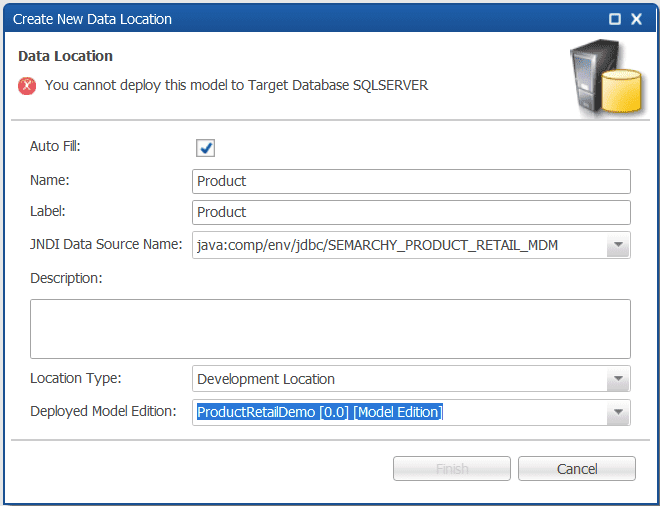
All runtime artifacts (tables, views, jobs, APIs...) are generated in the target database during deployment. While deployment is usually straightforward, errors may occur when:
- The model’s configured Target Database does not match the actual DBMS.
- The model was originally created for another database platform.
- The default database type (typically PostgreSQL) was not adjusted.
A typical error message looks like: "You cannot deploy this model to Target Database <xxx>".
Summarized Solution
To resolve this issue:
- Open the model in Application Builder.
- Double-click the root node of the model.
- Locate the Target Database property.
- Change it to match your actual DBMS.
- Validate and redeploy the model.
The Target Database setting must match the database type configured in the data location.
Detailed Solution
1. Understand the root cause
When creating a new model:
- The default target database is often POSTGRESQL.
- If your environment uses another DBMS, this setting must be manually updated.
If the model’s target database does not match the database type of the data location:
- xDM prevents deployment.
- The error message is displayed.
- No database objects are generated.
This is a protective mechanism to prevent incompatible DDL generation.
2. How to verify the target database setting
- In the application builder, open the model you are attempting to deploy.
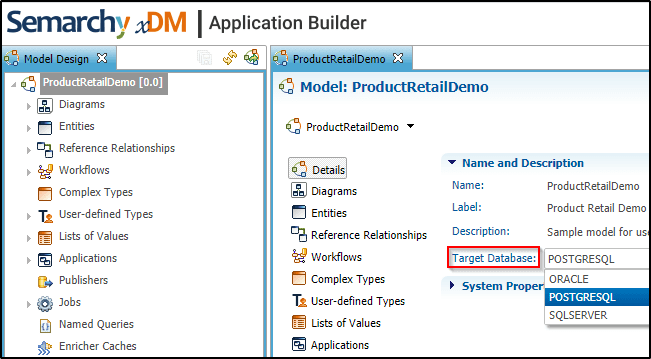
- In the model design panel, double-click the root node (top-level model element).
- Locate the property target database.
- If the value does not match your actual database platform, deployment will fail.
3. Correct the target database
- Change the target database to match your environment:
- Save and validate the model.
- Redeploy.
Deployment should now proceed successfully.
4. Verify data location configuration
If the issue persists, also verify:
- The data location is configured with the correct database connection.
- The JDBC driver corresponds to the correct DBMS.
5. When migrating between DBMS platforms
If you migrated a model from one DBMS to another:
- Change the target database property.
- Review data types (some DB-specific differences may exist).
- Regenerate DDL by redeploying.
- Ensure no database-specific SQL logic remains incompatible.