
When invoking a webservice with Stambia DI, you may need to include special character in the url and don't want them to be encoded. This article explains how to do that, with a wsdl metadata.
Need
Customers may need to include special characters in the URL when invoking a web service and want to ensure these characters are not encoded.
Summarized Solution
Use the Binding Type http:urlReplacementNotEncoded for parameters that should not be encoded.
Detailed Solution
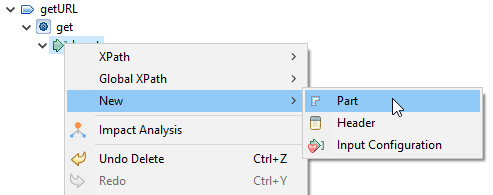
- In your wsdl metadata, add a part to the Input node. Right-click on Input and choose New, then Part:
- Give a name to this part (for example, url1) and set the Binding Type to
http:urlReplacementNotEncoded.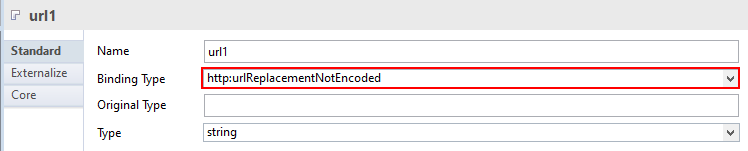
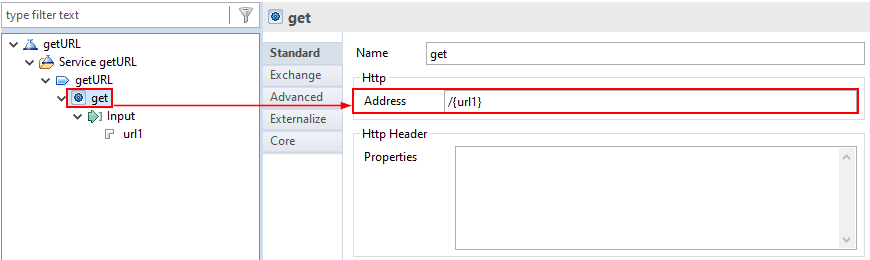
- Add the parameter url1 to the address, enclosed in brackets. This will be included in the request URL.
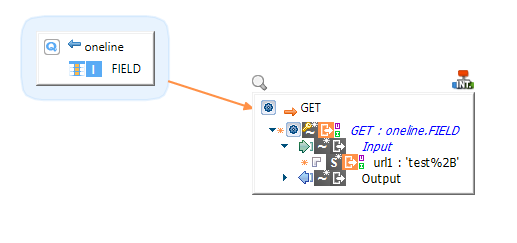
- You can now create a mapping to call the web service and assign a value to this part of the URL, which will not be encoded.
Notes
- When using the Binding Type
http:urlReplacementNotEncoded, the URL will end with the special character as intended (e.g.,/test%2B). - If you had chosen the Binding Type
http:urlReplacement, the URL would have been encoded (e.g.,/test%252B), as the character%is encoded to%25. - You can have both encoded and non-encoded parameters in the same request URL by setting the corresponding Binding Type for each parameter