UDF for Google Address Validation API in Snowflake Native App
A
Ambuj Srivastava
started a topic
7 months ago
Introduction
There is a limitation with Snowflake Native Apps to execute the plug-ins/Rest API enrichers due to Snowflake hybrid tables. This limitation cause integration jobs to fail with errors:
Need
The need of this UDF is to replace the error during REST API calls made from application when multiple records gets processes in any integration job.
Summarized Solution
The solution contains the steps to be performed at Snowflake database and Semarchy xDM design to call the function in enricher.
Detailed Solution
To overcome the error and execute the API using a stored procedure, the solution provided steps to implement the enricher via google address validator API using python within the procedure. This replace the need of calling API from Rest Clients plug in in enricher which turns out as an error.
1. Overview
This solution describes how to configure Snowflake to call the Google Address Validation
API securely using:
● Snowflake Secrets
● Network Rules
● External Access Integration (EAI)
● A Python UDF
● Role-based access control (RBAC)
This setup enables address validation directly within Snowflake SQL queries.
2. Architecture Overview
The solution includes:
1. Secure storage of Google API key using Snowflake Secret
2. Controlled outbound access via Network Rule
3. Secure API invocation via External Access Integration
4. Python-based User Defined Function (UDF) that:
Calls Google Address Validation API
Normalizes and validates address input
Returns structured output as VARIANT (JSON)
3. Prerequisites
Before starting, ensure:
● You have ACCOUNTADMIN or appropriate privileges to:
Create Secrets
Create Network Rules
Create External Access Integrations
A valid Google Address Validation API Key
● Target database: CUSTOMERB2C
● Target role: semarchy_customer_b2c_mdm
Configuration Steps
Step 1: Create Secret for Google API Key
This securely stores the Google API key inside Snowflake
CREATE OR REPLACE SECRET GMAPS_ADDRESSVALIDATION_KEY
TYPE = GENERIC_STRING
SECRET_STRING = 'YOUR_GOOGLE_API_KEY';
Step 2: Grant Role Access to Database
GRANT USAGE ON DATABASE CUSTOMERB2C TO ROLE semarchy_customer_b2c_mdm;
Step 3: Grant Role Access to Secret
GRANT READ ON SECRET
CUSTOMERB2C.CUSTOMERB2C.GMAPS_ADDRESSVALIDATION_KEY
TO ROLE semarchy_customer_b2c_mdm;
This allows the role to retrieve the secret during UDF execution.
GRANT USAGE ON INTEGRATION GOOGLE_ADDRESSVALIDATION_EAI
TO ROLE semarchy_customer_b2c_mdm;
Step 7: Create Python UDF for Address Validation
This function accepts 2 parameters:
1. Address_Lines > Concatenated value of all address attributes
2. Region_Code > ‘AU’ for Australia or any other country code based upon requirements
CREATE OR REPLACE FUNCTION
CUSTOMERB2C.CUSTOMERB2C.FN_VALIDATE_ADDRESS_GMAPS_CUSTOM2(
ADDRESS_LINES STRING,
REGION_CODE STRING
)
RETURNS VARIANT
LANGUAGE PYTHON
RUNTIME_VERSION = 3.10
PACKAGES = ('requests','snowflake-snowpark-python')
HANDLER = 'validate_address'
EXTERNAL_ACCESS_INTEGRATIONS = (GOOGLE_ADDRESSVALIDATION_EAI)
SECRETS = ('google_key' =
CUSTOMERB2C.CUSTOMERB2C.GMAPS_ADDRESSVALIDATION_KEY)
AS
$$
import json
import requests
import _snowflake
def _normalize_address_lines(value):
if value is None:
return []
if isinstance(value, str):
s = value.strip()
if s.startswith("[") and s.endswith("]"):
try:
parsed = json.loads(s)
if isinstance(parsed, list):
return [str(x).strip() for x in parsed if
str(x).strip()]
except Exception:
pass
return [s] if s else []
s = str(value).strip()
return [s] if s else []
def _pick_component(components, component_type):
if not isinstance(components, list):
return None
for c in components:
if not isinstance(c, dict):
continue
if c.get("componentType") == component_type:
name = c.get("componentName") or {}
if isinstance(name, dict):
return name.get("text") or name.get("name")
return None
def validate_address(address_lines, region_code):
api_key = _snowflake.get_generic_secret_string("google_key")
if not api_key:
raise Exception("Missing secret 'google_key'.")
url =
f"https://addressvalidation.googleapis.com/v1:validateAddress?key
={api_key}"
lines = _normalize_address_lines(address_lines)
body = {"address": {"addressLines": lines}}
if region_code and str(region_code).strip():
body["address"]["regionCode"] = str(region_code).strip()
r = requests.post(url, json=body, timeout=20)
if r.status_code >= 400:
try:
err = r.json()
except Exception:
err = {"error": r.text}
raise Exception(f"Google Address Validation API error
{r.status_code}: {json.dumps(err)}")
raw = r.json()
result = raw.get("result") or {}
addr = (result.get("address") or {})
postal = (addr.get("postalAddress") or {})
comps = (addr.get("addressComponents") or [])
formatted_address = addr.get("formattedAddress")
address_lines_out = postal.get("addressLines") or []
# Make a single string (comma-separated). Could also join
with '\n' if you prefer.
address_line = ", ".join([str(x) for x in address_lines_out])
if isinstance(address_lines_out, list) else None
if not formatted_address and address_line:
formatted_address = address_line
return {
"formatted_address": formatted_address,
"region_code": postal.get("regionCode") or
body["address"].get("regionCode"),
"language_code": postal.get("languageCode"),
"administrative_area": postal.get("administrativeArea")
or _pick_component(comps, "administrative_area_level_1"),
"locality": postal.get("locality") or
_pick_component(comps, "locality"),
"address_line": address_line,
"postal_code": postal.get("postalCode") or
_pick_component(comps, "postal_code")
}
$$;
Step 8 : Grant Usage on the function to the role
GRANT USAGE ON FUNCTION
CUSTOMERB2C.CUSTOMERB2C.FN_VALIDATE_ADDRESS_GMAPS_CUSTOM2(STRING, STRING)
TO ROLE semarchy_customer_b2c_mdm;
In the next step, a new function is created to break the JSON response Key-Value pair to fetch
the value.
Step 10 : Create Snowflake UDF to fetch the value from response
Use below expression to create the function:
CREATE OR REPLACE FUNCTION GET_JSON_VAL_SUBSTR(JSON_TXT STRING, KEYNAME STRING)
RETURNS STRING
LANGUAGE SQL
AS
$$
CASE
WHEN JSON_TXT IS NULL OR KEYNAME IS NULL THEN NULL
WHEN POSITION('"' || KEYNAME || '":"' IN JSON_TXT) = 0 THEN NULL
ELSE
SUBSTR(
JSON_TXT,
/* start position of the value */
POSITION('"' || KEYNAME || '":"' IN JSON_TXT) + LENGTH('"' || KEYNAME
|| '":"'),
/* length = position of next quote - start position */
CHARINDEX(
'"',
JSON_TXT,
POSITION('"' || KEYNAME || '":"' IN JSON_TXT) + LENGTH('"' || KEYNAME
|| '":"')
)
- (
POSITION('"' || KEYNAME || '":"' IN JSON_TXT) + LENGTH('"' || KEYNAME
|| '":"')
)
)
END
$$;
The function requires 2 arguments
1. JSON_TXT > output of Google Address Validator function.
2. KEYNAME > The name of the Key in the key value pair output
Step 11: Grant Usage on the function to the application role
GRANT USAGE ON FUNCTION CUSTOMERB2C.CUSTOMERB2C.GET_JSON_VAL_SUBSTR(STRING,
STRING) TO ROLE semarchy_customer_b2c_mdm;
Changes to be done at Semarchy Design
Step 1: Create the Database Functions
Fully Qualified name to be used in Schema.
Step 2:Create attributes:
GoogleAddressLine - Used in Enricher to CONCATENATE the address components.
CustomOutput - Stores the JSON output from Google Function
GoogleAttributes- Used to store data from JSON output
Step 2: Create Enrichers
CustomOutput is getting enriched in this enricher to call the function:
q2. Enricher to extract the values from JSON output received in CustomOutput field:
Step 3: Add the attributes in UI
Add attributes to form/collection to preview the data in UI.
Step 4: Test the functionality by importing the data
Execute insert statement to test the functionality.
Attached is the document having all the above steps can be downloaded for reference.

Ambuj Srivastava
Introduction
There is a limitation with Snowflake Native Apps to execute the plug-ins/Rest API enrichers due to Snowflake hybrid tables. This limitation cause integration jobs to fail with errors:
Need
Step 2: Grant Role Access to Database
Step 3: Grant Role Access to Secret
This allows the role to retrieve the secret during UDF execution.
Step 4: Create Network Rule (Egress Configuration)
This defines allowed outbound traffic.
CREATE OR REPLACE NETWORK RULE GOOGLE_ADDRESSVALIDATION_EGRESS
MODE = EGRESS
TYPE = HOST_PORT
VALUE_LIST = ('addressvalidation.googleapis.com:443');
This allows secure HTTPS calls to Google API.
Step 5: Create External Access Integration
This links:
● Network rule
● Secret
● Enables outbound API calls
Step 6: Grant Role Usage on Integration
Step 7: Create Python UDF for Address Validation
This function accepts 2 parameters:
1. Address_Lines > Concatenated value of all address attributes
2. Region_Code > ‘AU’ for Australia or any other country code based upon requirements
CREATE OR REPLACE FUNCTION
CUSTOMERB2C.CUSTOMERB2C.FN_VALIDATE_ADDRESS_GMAPS_CUSTOM2(
ADDRESS_LINES STRING,
REGION_CODE STRING
)
RETURNS VARIANT

LANGUAGE PYTHON
RUNTIME_VERSION = 3.10
PACKAGES = ('requests','snowflake-snowpark-python')
HANDLER = 'validate_address'
EXTERNAL_ACCESS_INTEGRATIONS = (GOOGLE_ADDRESSVALIDATION_EAI)
SECRETS = ('google_key' =
CUSTOMERB2C.CUSTOMERB2C.GMAPS_ADDRESSVALIDATION_KEY)
AS
$$
import json
import requests
import _snowflake
def _normalize_address_lines(value):
if value is None:
return []
if isinstance(value, str):
s = value.strip()
if s.startswith("[") and s.endswith("]"):
try:
parsed = json.loads(s)
if isinstance(parsed, list):
return [str(x).strip() for x in parsed if

str(x).strip()]

except Exception:
pass

return [s] if s else []
s = str(value).strip()
return [s] if s else []
def _pick_component(components, component_type):
if not isinstance(components, list):
return None
for c in components:
if not isinstance(c, dict):

continue
if c.get("componentType") == component_type:
name = c.get("componentName") or {}
if isinstance(name, dict):
return name.get("text") or name.get("name")

return None
def validate_address(address_lines, region_code):
api_key = _snowflake.get_generic_secret_string("google_key")
if not api_key:
raise Exception("Missing secret 'google_key'.")
url =
f"https://addressvalidation.googleapis.com/v1:validateAddress?key
={api_key}"
lines = _normalize_address_lines(address_lines)
body = {"address": {"addressLines": lines}}
if region_code and str(region_code).strip():
body["address"]["regionCode"] = str(region_code).strip()
r = requests.post(url, json=body, timeout=20)
if r.status_code >= 400:
try:
err = r.json()
except Exception:
err = {"error": r.text}
raise Exception(f"Google Address Validation API error

{r.status_code}: {json.dumps(err)}")
raw = r.json()
result = raw.get("result") or {}

addr = (result.get("address") or {})
postal = (addr.get("postalAddress") or {})
comps = (addr.get("addressComponents") or [])
formatted_address = addr.get("formattedAddress")
address_lines_out = postal.get("addressLines") or []
# Make a single string (comma-separated). Could also join
with '\n' if you prefer.
address_line = ", ".join([str(x) for x in address_lines_out])
if isinstance(address_lines_out, list) else None
if not formatted_address and address_line:
formatted_address = address_line
return {
"formatted_address": formatted_address,
"region_code": postal.get("regionCode") or

body["address"].get("regionCode"),

"language_code": postal.get("languageCode"),
"administrative_area": postal.get("administrativeArea")
or _pick_component(comps, "administrative_area_level_1"),

"locality": postal.get("locality") or

_pick_component(comps, "locality"),
"address_line": address_line,
"postal_code": postal.get("postalCode") or

_pick_component(comps, "postal_code")
}
$$;
Step 8 : Grant Usage on the function to the role
Step 9: Calling the function within Snowflake
select FN_VALIDATE_ADDRESS_GMAPS_CUSTOM2('12 Shelley Street,
Sydney, NSW 2000, Australia','AU');
The output of which will look like the following:
{
"address_line": "12 Shelley Street",
"administrative_area": "NSW",
"formatted_address": "12 Shelley Street, Sydney NSW 2000, Austria",
"language_code": "en",
"locality": "Sydney",
"postal_code": "2000",
"region_code": "AU"
}
In the next step, a new function is created to break the JSON response Key-Value pair to fetch
the value.
Step 10 : Create Snowflake UDF to fetch the value from response
Use below expression to create the function:
CREATE OR REPLACE FUNCTION GET_JSON_VAL_SUBSTR(JSON_TXT STRING, KEYNAME STRING)
RETURNS STRING
LANGUAGE SQL
AS
$$
CASE
WHEN JSON_TXT IS NULL OR KEYNAME IS NULL THEN NULL
WHEN POSITION('"' || KEYNAME || '":"' IN JSON_TXT) = 0 THEN NULL
ELSE
SUBSTR(
JSON_TXT,
/* start position of the value */
POSITION('"' || KEYNAME || '":"' IN JSON_TXT) + LENGTH('"' || KEYNAME
|| '":"'),
/* length = position of next quote - start position */
CHARINDEX(
'"',
JSON_TXT,
POSITION('"' || KEYNAME || '":"' IN JSON_TXT) + LENGTH('"' || KEYNAME
|| '":"')
)
- (
POSITION('"' || KEYNAME || '":"' IN JSON_TXT) + LENGTH('"' || KEYNAME
|| '":"')
)
)
END
$$;
The function requires 2 arguments
1. JSON_TXT > output of Google Address Validator function.
2. KEYNAME > The name of the Key in the key value pair output
Step 11: Grant Usage on the function to the application role
Changes to be done at Semarchy Design
Step 1: Create the Database Functions
Fully Qualified name to be used in Schema.
Step 2:Create attributes:
Step 2: Create Enrichersq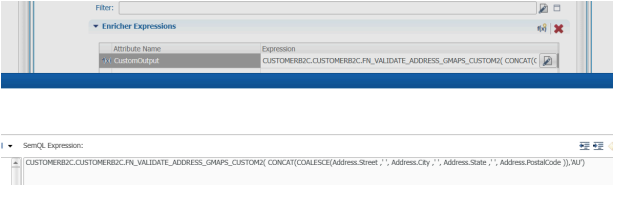 2. Enricher to extract the values from JSON output received in CustomOutput field:
Step 3: Add the attributes in UI
Add attributes to form/collection to preview the data in UI.
Step 4: Test the functionality by importing the data
Execute insert statement to test the functionality.
Attached is the document having all the above steps can be downloaded for reference.